Conversion tracking
Conversion tracking for links and QR codes
Track conversions from every click and scan. Connect your website in minutes, pick the actions that matter, and compare links and QR codes by conversion rate in one dashboard.

From click to conversion in three steps

Add ShortPen to your site in minutes, by hand or with an integration like our Shopify app.

Pick the signups, purchases or pages that count as a conversion. It only takes a few clicks.

Turn on event tracking for a link or QR code. Its conversions show up next to clicks and scans.
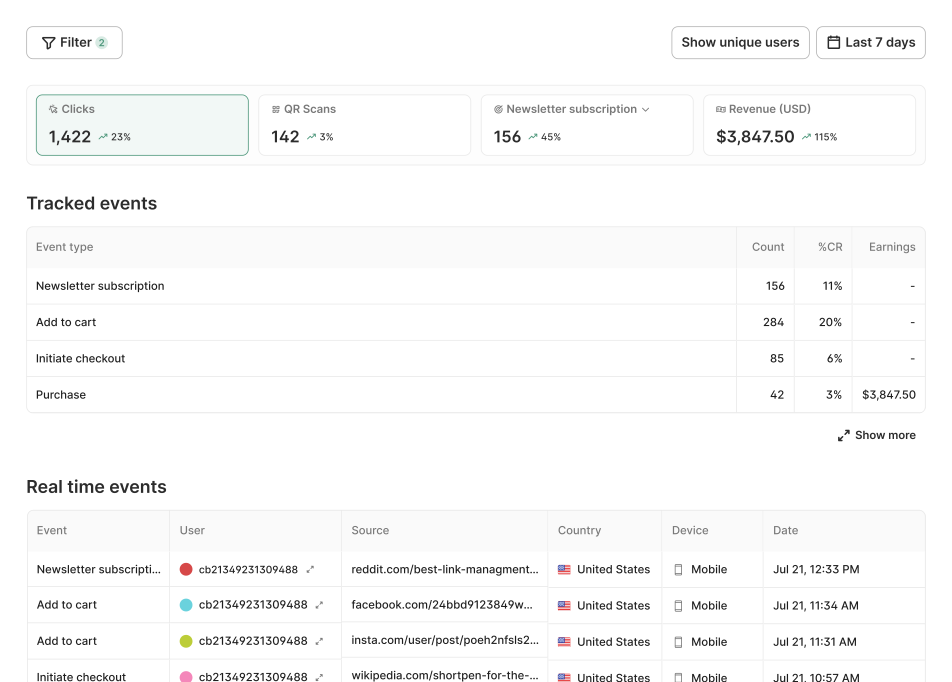
See conversions next to every click and scan
Every link and QR code gets its own conversion report, right beside its traffic, ready to share
Compare each event's count and conversion rate on a single link
Filter by source, country, device or browser to find where conversions come from
Compare links across the workspace by client, folder or tag
Share a read-only report that clients and teammates open without an account

Track the actions you care about
A conversion is whatever your business counts: a signup, a lead, a purchase, etc.
Record a conversion when a visitor reaches a page like /thank-you
Send an event from your code for steps without their own page, like a signup in a modal
Track Add to cart, Checkout and Purchase on Shopify without writing code, with more platforms on the way
Test every event before launch so test visits stay out of your reports
Watch conversions arrive in real time
Each conversion appears as a row the moment it happens
See the event, source, country, device and time for every conversion
Open a visitor's activity to follow the path from click or scan to signup
Check a launch in the first hour instead of waiting for tomorrow's totals




What people actually say
Don't take our word for it. These are real people who use ShortPen to manage links, track campaigns, and run QR codes across their business.


The simple way to connect a link to a result
Works on every channel, online and offline
Counts every click, even when UTMs get stripped
Keeps tracking when links are shared and forwarded
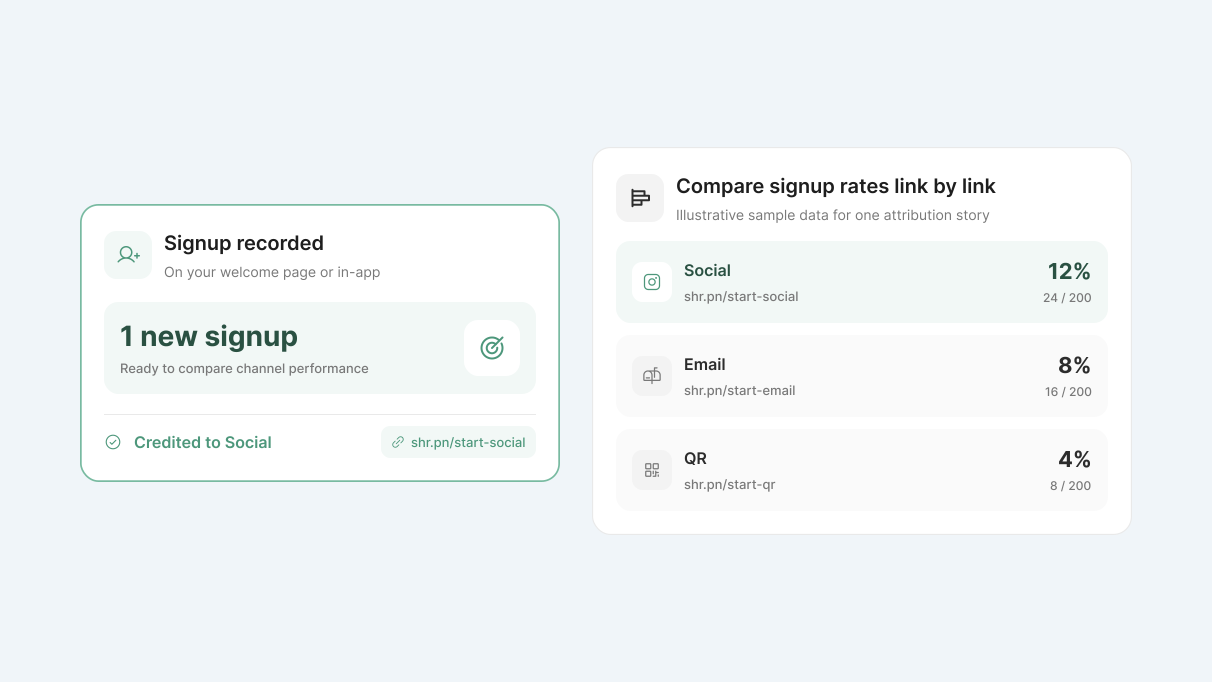
Credits the conversion to the exact link or QR code
Clicks, scans and conversions in one dashboard, with %CR
Last-click credit with no time limit
No engineering resources needed
Setup time
Minutes
UTMs only
Partial
Partial
Partial
Up to 90 days
Minutes per link
Cookie
Partial
Ends when the cookie expires
Days to weeks
Conversions are just the start
Conversion tracking works with every other part of ShortPen
Questions about conversion tracking
If something's stopping you from trying ShortPen, the answer is probably here.
What is link conversion tracking?
It connects a click on a link, or a scan of a QR code, to what the visitor does next on your site, like signing up or buying. You see which links lead to results, not only which links get clicks.
How does ShortPen connect a click to a conversion?
What is the ShortPen Pixel?
Do I need a developer to set it up?
Does it work with Shopify?
Which platforms does ShortPen connect to?
Do QR code scans count?
Will I see conversions from before I set it up?
Do I need to turn on tracking for each link?
Does event tracking slow down my links?
What data does ShortPen collect?
What happens when I reach my monthly conversion limit?
How many conversions does the free plan include?
Can I share conversion reports with clients?
Ready to make every click count?
Simplify your link management, gain valuable insights, and take control of your online presence. Your journey to better links starts here.