QR Codes
Create dynamic QR codes you can brand and track
Brand every code with your logo and colors, change the destination anytime, and track scans and conversions in real time.
Unlimited dynamic QR codes | Codes never expire

One place for every kind of code
…and dozens of other types
Make it look like it belongs on your packaging
A black-and-white square on a well-designed box looks like an afterthought. Match the code to the rest of the print.
Use brand colors, gradients or multicolor designs
Drop your logo in the centre, or upload a new one
Save a design as a template and reuse it on every new code
Download SVG for print and design tools, PNG for slides and web


Print once, change the destination as often as you like
Every ShortPen QR code that points to a web page is dynamic. The code stays the same on paper and the page behind it changes when you edit it in ShortPen.
Swap a seasonal offer for the next one without a reprint
Fix a broken link on 10,000 printed flyers in one edit
Keep the full scan history when the destination changes
Know which placement got scanned
Scans sit next to clicks in the same dashboard, so a poster and a newsletter are measured on the same screen.
Total and unique scans over any date range
Country, device, browser, platform and language
UTM breakdowns for codes that carry campaign tags
A shareable report link for clients, no login needed
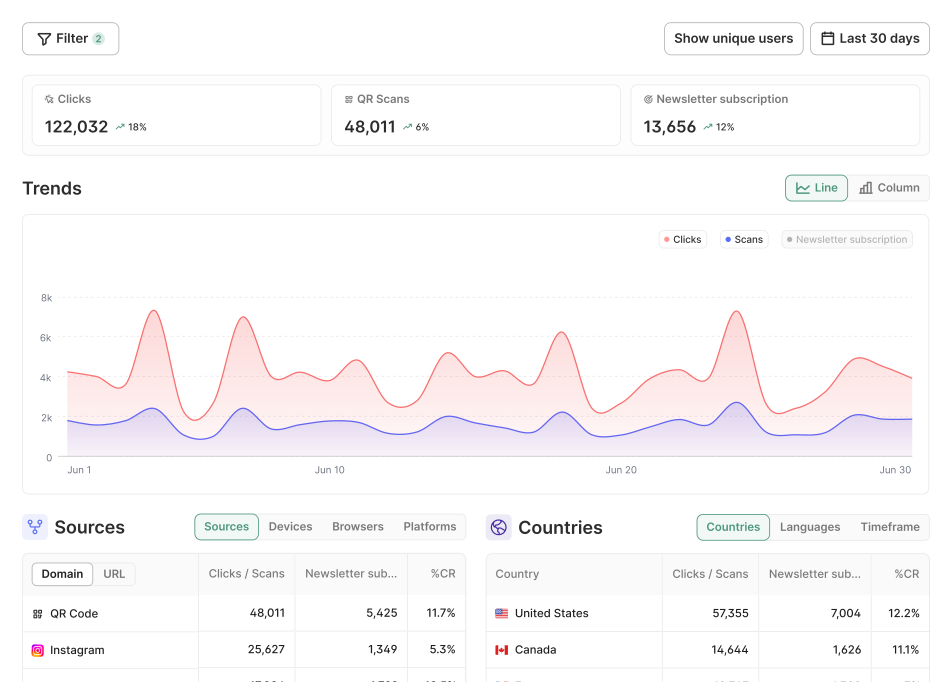

See every scan, and the sales that follow
A scan tells you someone picked up the flyer. A conversion tells you whether it paid for itself. Connect your site once, pick the actions that count, and ShortPen credits each one to the code that was scanned.
Conversions (signups, purchases, downloads, etc.) credited to every code
Easy to set up on any site, with a native Shopify app
Real-time event log to check it's firing before the print run





Why professionals choose ShortPen
What people actually say
Don't take our word for it. These are real people who use ShortPen to manage links, track campaigns, and run QR codes across their business.


QR codes are just the start
Every feature connects back to the same question: what actually happened after someone scanned? These are the tools that help you answer it.
Questions before you print
If something's stopping you from trying ShortPen, the answer is probably here.
What's the difference between a static and a dynamic QR code?
A static code has the destination built into the pattern, so it can't be changed or tracked. A dynamic code points to a short link, so you can change the destination and count every scan. ShortPen codes that open a web page or file are dynamic.
Do ShortPen QR codes expire?
Can I change where a printed code goes?
How many QR codes can I make for free?
What types of QR code can I create?
Can I track WiFi codes?
What file format should I use for print?
Will a logo stop my code from scanning?
What does ShortPen record when someone scans?
How do I track sales from a QR code?
Can I move my codes from Bitly or another platform?
Ready to make every click count?
Simplify your link management, gain valuable insights, and take control of your online presence. Your journey to better links starts here.