Analytics
Track clicks, scans and conversions for every link and QR code you share
See where visitors come from, measure the signups and sales that follow, and compare all your links in one dashboard

What happens after someone clicks

Someone clicks or scans
ShortPen records where the visit came from, plus country, device and browser.
They convert on your site
Your website reports the action, and ShortPen ties it back to the link they used.
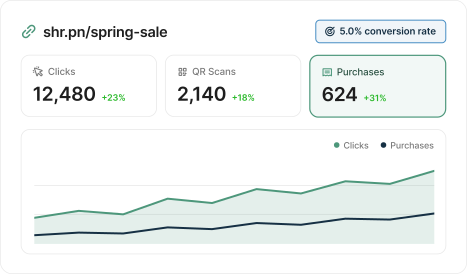
You see both in one report
Clicks, scans and conversions sit side by side, so you know which links pay off.
See where every click and scan comes from
Every link and QR code tracks its own audience from the first visit.
Compare clicks and scans, total or unique
Trace traffic to the referring site or the exact page
Sort visitors by country, language, device, browser and operating system
Spot the days and hours your audience is most active

Track the signups and sales each link brings in
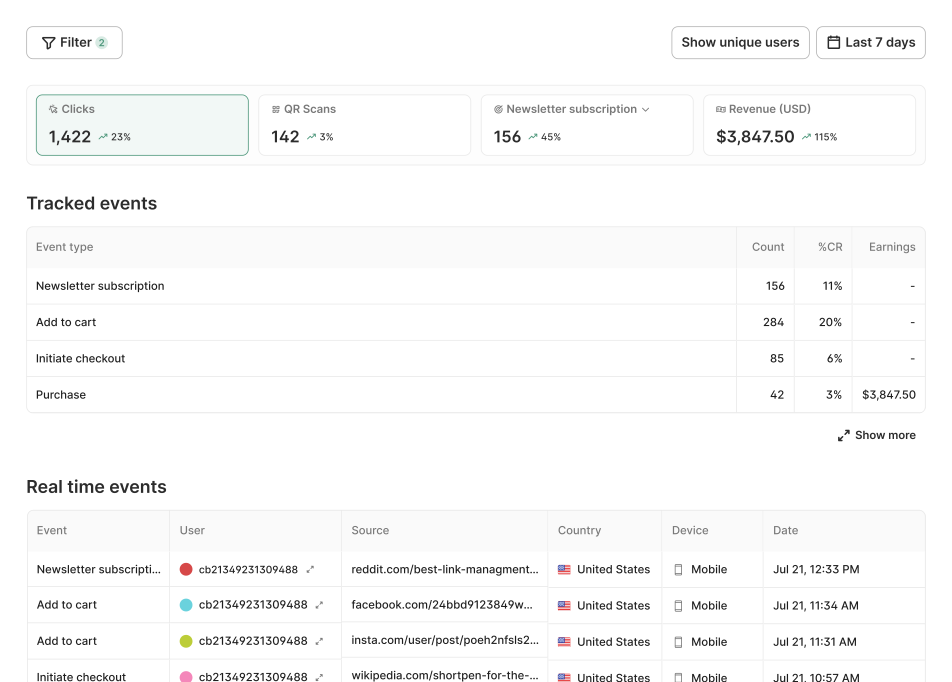
Connect your website once, and ShortPen counts what visitors do after they land.
Count signups, purchases and form submissions for every link
See the conversion rate next to each event
Filter any breakdown by a conversion to find the sources that sell
Track add-to-cart, checkout and purchase on Shopify with no code
Compare links, clients and channels in one view
Workspace analytics add up every link and QR code, so you can rank them and compare groups.
Rank your top links, QR codes and events
Group results by folder, tag or domain
Break traffic down by UTM source, medium and campaign
Stack filters to isolate one segment, like mobile visitors from Germany


Watch activity as it happens and share the numbers
Check a launch in real time, then send the results to people who don't use ShortPen.
Follow clicks, scans and events in a live feed
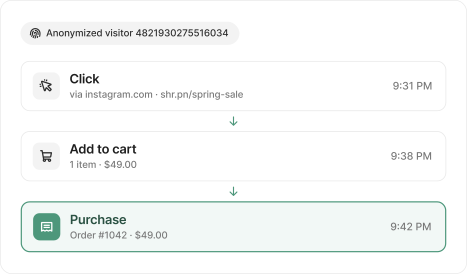
Trace an anonymized visitor from click to conversion when you debug a launch
Share a read-only dashboard through a public link
Pull raw click events into your own reports with the API
Why professionals choose ShortPen
What people actually say
Don't take our word for it. These are real people who use ShortPen to manage links, track campaigns, and run QR codes across their business.


Analytics work best with the rest of ShortPen
Every feature connects back to the same question: what actually happened after someone scanned? These are the tools that help you answer it.
Frequently asked questions
If something's stopping you from trying ShortPen, the answer is probably here.
What does ShortPen analytics track?
Clicks and QR scans, total and unique. Each one comes with the referring site and page, country, browser language, device, browser, operating system, UTM values and time. If you connect your website, it also tracks the conversions you define, like signups and purchases.
Do I need to install anything to track clicks?
How do I track conversions?
Does ShortPen collect personal data about my visitors?
What's included on the free plan?
Can I share analytics with a client?
Does changing a link's destination reset its analytics?
Why do some clicks show "Direct" as the source?
How is ShortPen different from Google Analytics?
Can I export my analytics data?
Ready to make every click count?
Simplify your link management, gain valuable insights, and take control of your online presence. Your journey to better links starts here.