Marketing Campaign Tracking: How to Measure what Actually Works
Last updated:
ShortPen University

LucaG is the co-founder of ShortPen. Before that, he built Guadagnissimo from scratch, a personal finance blog that reached hundreds of thousands of readers per year and was later acquired. That experience is where he learned SEO and marketing attribution hands-on. He also runs NTSOT, a newsletter on tools for work and life. His background spans product design, growth, and building online businesses.
Show more
Marketing campaign tracking ties a click, a scan or a conversion back to the exact campaign that caused it, so you can move budget toward what works. It runs on four methods: UTM parameters, tracking pixels, cookies and QR codes.
Most teams run campaigns across email, paid social, search, and offline at the same time. Then someone asks which one drove the signups, and the honest answer is a shrug. Budget keeps flowing toward channels nobody can prove are working.
Marketing campaign tracking fixes that. It's how you tie a click, a scan, or a conversion back to the exact campaign that caused it, so you can move money toward what works and cut what doesn't.
This guide covers what campaign tracking is, the methods that make it run (UTMs, pixels, cookies, and QR codes), how to set it up step by step, the metrics worth watching, and how to connect a click to an actual sale instead of stopping at traffic counts.
What is marketing campaign tracking?
Marketing campaign tracking is the process of measuring how your campaigns perform by recording where traffic comes from, what people do after they arrive, and what revenue results. It turns scattered activity into data you can act on.

The mechanism is simple at its core. You tag the links in your campaigns so that when someone clicks, your analytics knows the source. Layer on conversion tracking and you can follow that person from first click to purchase.
The two meanings people search for
"Campaign tracking" gets used two ways, and it's worth separating them.
One is performance measurement: UTMs, analytics, attribution, the subject of this guide.
The other is project tracking: spreadsheets and templates for managing campaign tasks, owners, and deadlines. If you came here for a status-tracking template, that's a different tool. Everything below is about measuring results.
Why it matters
Tracking is what turns a vague number into a decision. "We got 500 visitors from Facebook" tells you almost nothing.
"Our Q4 retargeting campaign brought 500 visitors who converted at 12%" tells you where to spend next and whether you're actually hitting your campaign goals.
The cost of getting it wrong is quiet and large. As the team at Kissmetrics puts it, if 20% of your campaign links are mistagged, 20% of your attribution data is wrong, and you never see an error message.
Bad tracking produces plausible numbers, which is more dangerous than no numbers, because you'll trust them.
The core methods of marketing campaign tracking
Most tracking runs on three mechanisms, usually combined. Each answers a different question.
UTM parameters
UTM parameters are tags you add to the end of a URL that tell your analytics where a click came from. They work on any channel, which is why they're the backbone of most campaign tracking.
There are five:
utm_source: the platform or publisher sending the traffic (newsletter, facebook, partner-site)utm_medium: the channel type (email, cpc, social)utm_campaign: the specific campaign (spring-sale-2026)utm_term: the paid-search keyword (optional)utm_content: the creative or placement variant for A/B tests (optional)
In practice you should always set source, medium, and campaign. Term and content are optional but useful when you want to compare keywords or creatives.
A tagged link looks like this:
https://yoursite.com/landing?utm_source=newsletter&utm_medium=email&utm_campaign=spring-sale-2026
When someone clicks, your analytics reads those tags and files the visit under the right campaign.
Tracking pixels
A tracking pixel is a small piece of code on your site that fires when someone takes an action: a signup, a purchase, a form submission. UTMs tell you a click happened. A pixel tells you what the person did next.
Pixels are most common in paid advertising and retargeting, where you need to know which ad produced a conversion, not just a visit. The distinction matters: clicks measure interest, pixel events measure outcomes.
Cookies
Cookies are small files stored on a visitor's device. They let you recognize a returning user and stitch together a journey: the pages they viewed, the products they added to a cart, the ads they saw before buying.
One correction, because a lot of older advice gets this wrong. Third-party cookies were not killed off. Google reversed its deprecation plan in July 2024, dropped the planned consent prompt in April 2025, and ended the Privacy Sandbox project in October 2025.
As of 2026, third-party cookies remain enabled by default in Chrome with no removal timeline, though Safari and Brave block them.
The practical takeaway: don't build your measurement on cookies alone. They're inconsistent across browsers and shrinking in reliability. A click on a tracked link or a QR scan is deterministic. It happens or it doesn't, regardless of browser settings. That's the more durable foundation, and where the link layer comes in.
Beyond the big three
A few other methods fill specific gaps: dedicated landing pages, promo or vanity codes (good for podcasts and radio), call tracking with unique numbers per channel, and QR codes for connecting offline campaigns to online analytics.
How to set up campaign tracking step by step
A working setup is a loop, not a one-time task. Here's the repeatable version.
1. Decide your naming convention first
This is the step everyone skips and everyone regrets. Analytics tools are case-sensitive, so Facebook, facebook, and fb become three different sources and your data fragments into nonsense.
Lock these rules before you build a single link:
Lowercase only. Always.
Hyphens, not spaces or underscores, inside values.
A controlled vocabulary for source and medium, so everyone uses the same words.
A structured campaign pattern, like 2026-q1-audience-goal. For example, 2026-q1-trial-retargeting.
Write it down in a shared doc. The convention is the single source of truth, and "be consistent" only works if consistent has a definition.
2. Build links with one tool, not by hand
Hand-editing URLs is the main source of tagging errors. Use one builder so every link follows your rules. Our Campaign URL Builder is the baseline starting point.
3. Shorten and brand the link
UTM-tagged URLs are long and ugly. They get truncated in ads and SMS, they look untrustworthy, and they're impossible to print or read aloud. A branded short link fixes the cosmetics while keeping the UTMs intact through the redirect.
This is also where you make the link itself the tracking instrument.
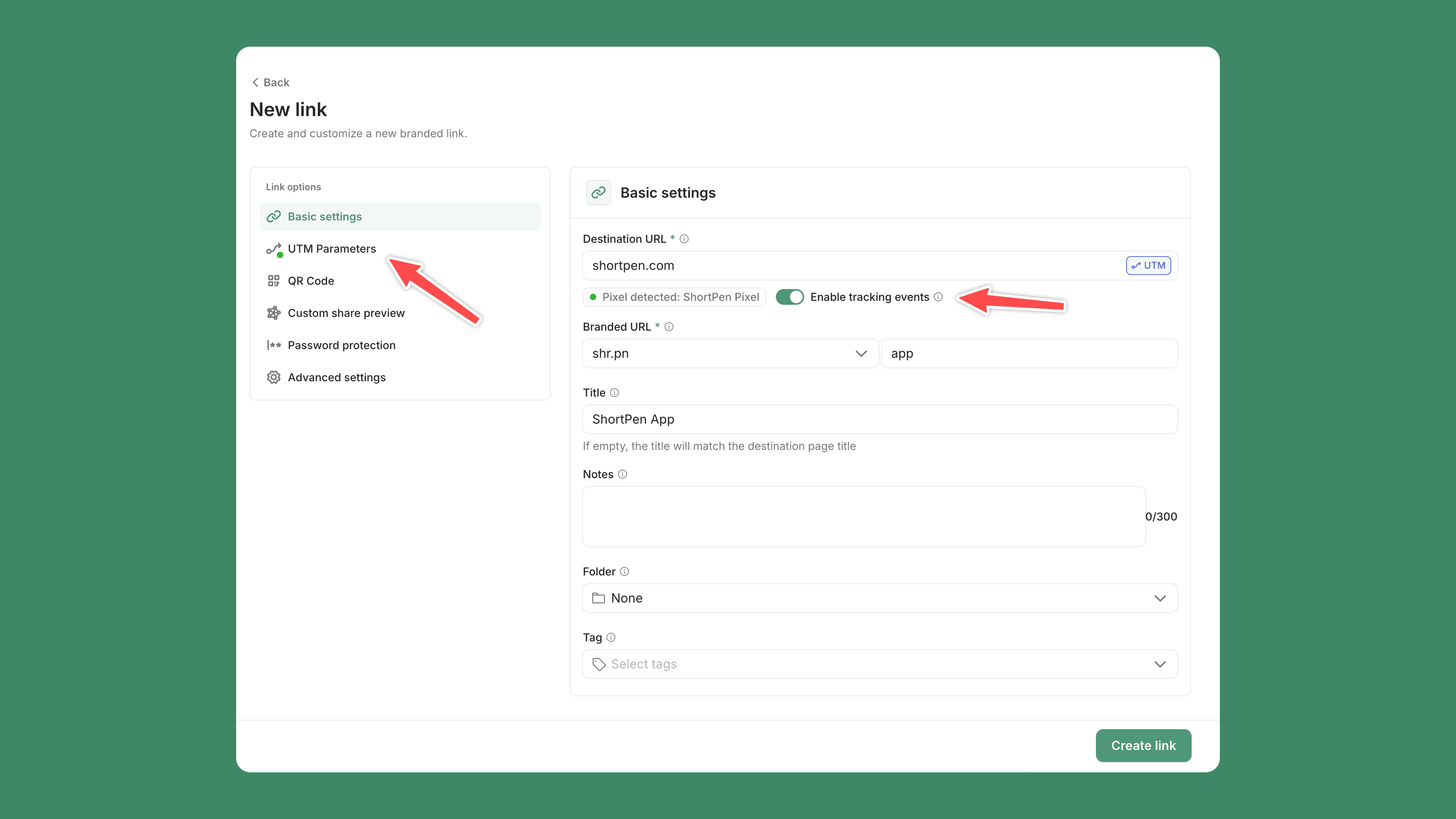
With ShortPen, you add your UTMs to a branded short link, and the platform preserves them through the redirect to the destination. Because the tags travel inside the URL, attribution survives even when referrer data gets stripped along the way, which is a common failure point with plain redirects.
4. Deploy across the channels you control
Tag every link in the marketing channels you own: email, paid ads, organic social posts, partner placements, and QR codes. Two firm rules:
Never put UTMs on internal links. Tagging a link between two pages on your own site overwrites the original source, so a visitor who arrived from a paid ad suddenly looks like internal traffic. Your attribution breaks.
Don't tag links you don't control, like organic-search results or links other people share. You'll only distort the data, while preserving UTMs through the redirect protects Tracking Data when referrer information is lost.
5. Read the report and reallocate
The point of tracking isn't collecting data. It's moving budget. Each cycle, look at which campaigns converted, shift spend toward them, and cut what underperformed. Then tag the next batch.
Connecting clicks to conversions, not traffic alone
Here's where most guides stop and most marketers get stuck. Knowing someone clicked is not the same as knowing they bought. Traffic counts feel like progress, but they don't pay for anything.
The maturity ladder: clicks to identity to revenue
Think of tracking as three rungs. Click data tells you a campaign drove traffic. Identity connects that click to a known person when they sign up, log in, or buy. Revenue connects that person to money. You climb from "this campaign got attention" to "this campaign produced $40,000," and only the top rung answers the question your CFO is asking.
Each rung needs a different mechanism. UTMs handle the click. A pixel and a conversion event handle identity and revenue.
How post-click conversion tracking actually works

Generic advice says "use a pixel to track conversions" and leaves you there. Here's the actual sequence, using ShortPen as the example, as a simple ladder for measuring the full customer journey from the first click to revenue while keeping the same three-rung setup.
Install the ShortPen Pixel once. It's a lightweight script that goes on your site, like any analytics tag, and helps you understand user behavior after the click. Then define the events that matter: a signup, a purchase, a form submission.
Events can be triggered by a URL (someone reaches your thank-you page), by code, or sourced from an integration.
Finally, enable event tracking on the link. From there, conversions attribute back to the link and the campaign that drove them, making it easier to compare conversion rates across sources.
One honest caveat most articles skip: events are not retroactive. Tracking starts the moment you create and activate an event, with no backfill of past traffic. Set up your events before a campaign launches, not after.
If you run a store, integrations cut the manual work. ShortPen's Shopify integration auto-maps Add to Cart, Checkout, and Purchase events, so a scan or click can be followed all the way to a completed order.
Attribution models in one minute
When multiple campaigns touch one customer, attribution models decide who gets credit.
First-touch credits the campaign that found the customer.
Last-touch credits the final click before purchase, and it's the common default.
Multi-touch spreads credit across the whole journey. None is "correct."
Pick the one that matches the decision you're making: first-touch for awareness questions, last-touch for closing, multi-touch for the full picture.
Tracking offline campaigns with QR codes
Offline is the hardest channel to attribute, which is why most guides give it one sentence. A billboard, a flyer, or a product insert has no referrer. Without a tracked link, it's invisible in your analytics.
QR codes that carry your tracking
A QR code that encodes a tracked, UTM-tagged short link brings offline traffic into the same dashboard as everything else. With ShortPen, every QR code is dynamic, which changes what's possible:
Scans are tracked separately from clicks, so you can see offline and online performance side by side.
You can change the destination without reprinting. The QR encodes the short link, so editing where it points costs nothing. Only changing the slug or domain requires a fresh code.
Tagging the link with
utm_medium=qrlets you compare offline campaigns against digital ones in the same report.
Add the Pixel and a scan can be followed through to a conversion, closing the offline-to-online loop.
Say you're testing three posters in three cities. Create a separate link per poster so each QR has its own analytics, then compare results by tag or folder.
Now "the Milan poster outperformed Rome 3 to 1" is a number you can act on, not a guess.
The metrics that actually matter
A typical marketing platform exposes more than a hundred metrics, and most teams meaningfully use fewer than ten. The skill is picking the few that map to your goal and ignoring the rest.
Match the metric to the campaign goal
Group your metrics by what the campaign is trying to do:
Awareness: impressions, reach. Did people see it?
Consideration: clicks, click-through rate, time on site. Did they engage?
Conversion: conversion rate, cost per acquisition, return on ad spend. Did they act, and was it worth it?
Tracking impressions on a campaign built to drive sales is how you end up reporting numbers that look good and mean nothing.
The four campaign performance metrics to anchor on
For most campaigns, four metrics carry the weight:
Conversion rate: the share of visitors who took the action you wanted.
Cost per acquisition (CPA): what you paid for each conversion.
Return on ad spend (ROAS): revenue divided by ad cost.
Customer lifetime value (CLV): total revenue a customer brings over time.
CPA without CLV is half a picture. A $50 CPA looks expensive until you learn the customer is worth $900.
Common campaign tracking mistakes
Most tracking problems trace to a short list of repeat offenders:
Inconsistent naming. facebook, Facebook, and fb split one campaign into three rows. Lowercase, controlled vocabulary, every time.
UTMs on internal links. They overwrite the original source and corrupt attribution. Never tag links between your own pages.
Tagging links you don't control. Organic-search and user-shared links shouldn't carry your UTMs.
Long UTM URLs breaking in transit. Tags get stripped in redirects or truncated in ads. Tag the destination before you shorten, then test the final link before launch.
Tag decay. Reusing an old tagged link on evergreen content keeps stale campaign data accruing for months. Refresh or retire old links.
Tracking clicks but never conversions. Traffic is not revenue. Set up conversion events.
No owner, no audit. Assign one person to own the convention and review the data monthly.
Choosing campaign tracking and analytics tools
The right stack depends on what you're measuring, but the categories are consistent.
The categories
A marketing campaign tracker centralizes campaign data and performance across tools.
Analytics platforms (like GA4) read your UTMs and report traffic and conversions.
Link management tools create branded short links and QR codes that carry tracking.
CRM ties campaigns to leads and deals.
Marketing automation connects campaigns to email and lifecycle flows.
Multi-channel reporting consolidates data from many platforms into one view.
Where a link management platform fits
Simple shorteners give you clicks. Full attribution suites give you everything and a steep bill. A modern link management platform sits in between, which for most teams is the practical sweet spot.
ShortPen covers the link layer end to end: branded short links and dynamic QR codes that carry UTMs, click and scan analytics with a Source / Medium / Campaign / Content / Term breakdown, post-click conversion events through the Pixel, and a URL shortening REST API (api.shortpen.com, Bearer token auth) for generating tracked links at scale from a store, CMS, or backend.
The free plan includes unlimited links, QR codes, and clicks plus one custom domain, with tracked events capped at 100 per month. API access and webhooks are on the paid plans.
Here's an honest comparison of where the main tools focus:
Tool | Branded links | Click vs scan analytics | Conversion events on free tier | API access |
|---|---|---|---|---|
Yes | Yes, tracked separately | Yes (capped) | Yes (paid) | |
Bitly | Yes (paid) | Clicks; scans on paid | No | Limited |
Rebrandly | Yes | Clicks | No | Paid |
Short.io | Yes (free domain) | Clicks | No | Yes |
Dub | Yes | Clicks | Paid tier | Yes |
ClickMagick | No (tracking-only) | N/A | Yes (no free plan) | Yes |
Verify current limits and pricing on each provider's site before deciding, since link-tool plans change often.
You can test branded links, dynamic QR codes, and event tracking on ShortPen's free plan before committing to anything.
FAQ
What is marketing campaign tracking?
Marketing campaign tracking is the process of measuring how your campaigns perform by recording where traffic comes from, what visitors do, and what revenue results. It works by tagging campaign links so your analytics can attribute each click, and layering conversion tracking so you can follow a visitor from first click to purchase.
What's the difference between UTMs, pixels, and cookies?
UTMs are tags on a URL that tell analytics where a click came from. A pixel is code on your site that records actions like signups and purchases. A cookie is a file stored on the visitor's device that recognizes them across visits. UTMs track the source, pixels track the outcome, cookies track the returning user.
Which UTM parameters are required?
Set utm_source, utm_medium, and utm_campaign on every campaign link. utm_term and utm_content are optional, used for paid-search keywords and for A/B testing creatives or placements.
Do UTM parameters hurt SEO?
No. UTM parameters are query strings that don't change page content, so they don't affect rankings directly. They can create duplicate-URL clutter if search engines index tagged versions, which is why most analytics tools strip them from the address bar after capture.
Do UTMs survive link shortening and QR scans?
Yes, as long as the UTMs are on the destination URL before you shorten it. A short link redirects to the full tagged URL, and a QR code that encodes a tracked link passes the tags through on scan. Always test the final link before launch to confirm the parameters arrive intact.
Do UTMs survive link shortening and QR scans?
Install a tracking pixel on your site, define the events that matter (signup, purchase, form submission), and enable event tracking on your campaign links. Conversions then attribute back to the campaign that drove them. Set events up before launch, since most pixels, including the ShortPen Pixel, do not track retroactively.
How do I track offline campaigns?
Use dynamic QR codes that encode a tracked, UTM-tagged short link. Tag the link with utm_medium=qr so offline scans appear alongside digital traffic in the same report. Because the QR points to a short link, you can change the destination without reprinting, and you can create a separate link per placement to compare them.
Are third-party cookies going away?
No. Google reversed its deprecation plan in 2024, dropped the planned consent prompt in April 2025, and ended the Privacy Sandbox project in October 2025. Third-party cookies remain enabled by default in Chrome as of 2026, though Safari and Brave block them. Either way, build your measurement on deterministic signals like tracked clicks and scans, which don't depend on browser cookie settings.
How often should I check campaign performance?
Match the cadence to spend velocity. Check high-spend campaigns and new launches in near real time, always-on campaigns daily, and attribution or lifetime-value reports weekly to monthly. The goal is to catch a budget-draining problem before the weekend, not after.
Conclusion
Campaign tracking is only as good as the link it rides on. Clean naming, UTMs that survive the redirect, and a pixel that ties clicks and scans to real conversions are what separate guessing from knowing. Everything else is detail.
Start small. Tag and shorten the links for one campaign, watch the source, medium, and campaign breakdown come through, then expand from there. If you want a no-cost way to try branded links, dynamic QR codes, and event tracking together, ShortPen's free plan covers all three.
Ready to make every click count?
Simplify your link management, gain valuable insights, and take control of your online presence. Your journey to better links starts here.