How To Edit QR Code Even After Printing
Last updated:
ShortPen University

LucaG is the co-founder of ShortPen. Before that, he built Guadagnissimo from scratch, a personal finance blog that reached hundreds of thousands of readers per year and was later acquired. That experience is where he learned SEO and marketing attribution hands-on. He also runs NTSOT, a newsletter on tools for work and life. His background spans product design, growth, and building online businesses.
Show more
You can edit a QR code after printing only if it is a dynamic QR code. A dynamic code points to a short link, so you change the destination in a few clicks and every printed copy follows. A static code has the destination locked into the pattern and has to be reprinted.
You printed 5,000 flyers. The QR code on them points to a landing page that no longer exists. The campaign changed, the URL broke, or someone typed the wrong link during setup. Now what?
The answer depends entirely on what type of QR code you created.
If it's a dynamic QR code, you can change the destination in a few clicks, and every printed code will start sending people to the new page.
If it's a static QR code, the destination is permanently locked into the pattern itself. No software can change it.
This guide explains how to edit a QR code, why only dynamic codes can be edited, and how to do it for free. It also covers what happens to your analytics after an edit, the one change that breaks a printed QR code, and what to do if you're stuck with a static code you can't modify.
How QR codes store data
Before you can understand why some QR codes can be edited and others can't, you need to know how they store information.
What's inside a QR code pattern
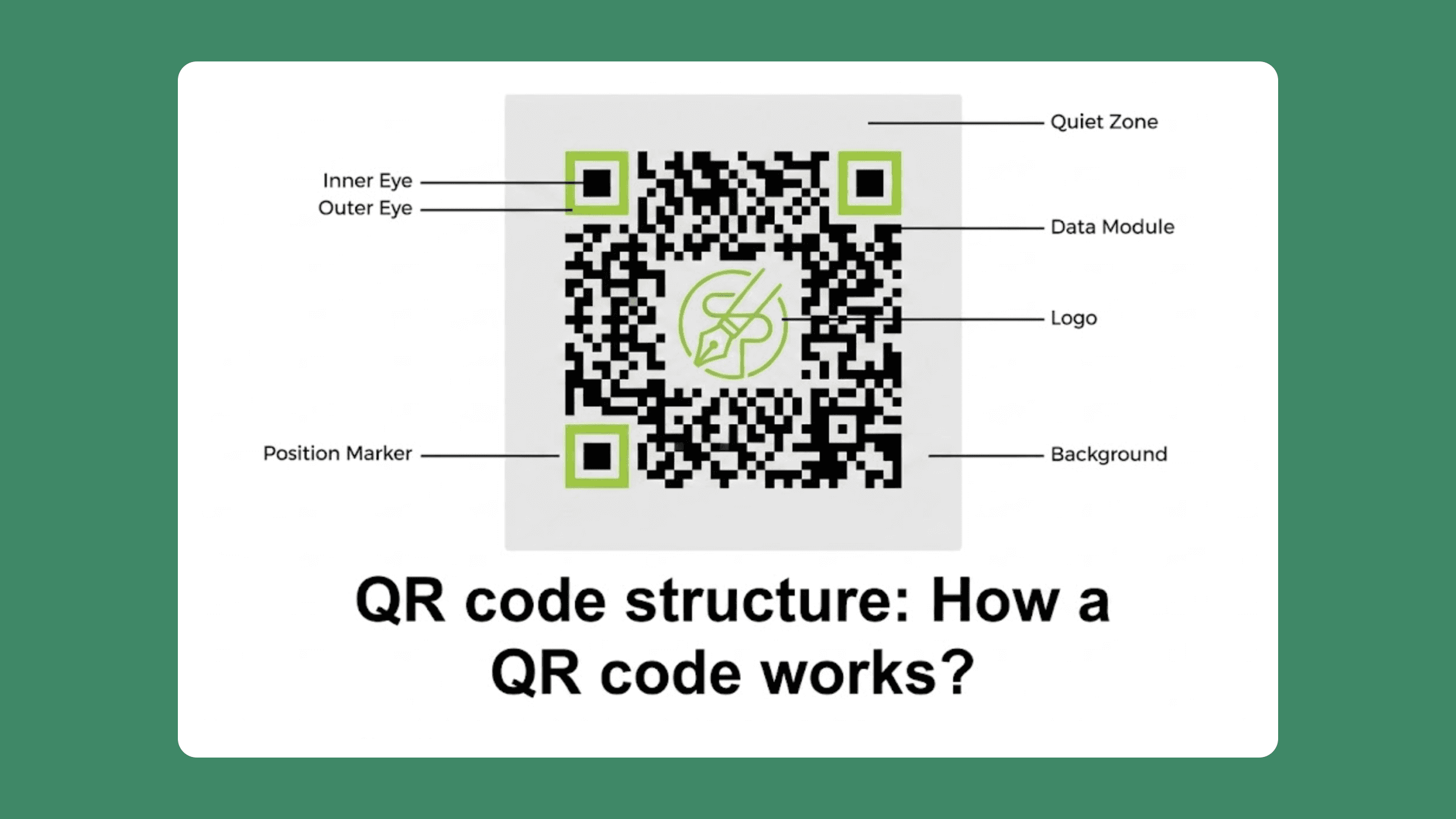
A QR code is a grid of dark and light squares called modules. When a phone scans it, the camera reads the arrangement of modules and decodes them into data: a URL, a block of text, contact info, or anything else you encoded.
The data is baked directly into the pattern. More data means more modules, which means a denser, more complex grid. A URL with 20 characters requires a 25x25 module grid (minimum print size of about 2 cm). A URL with 100 characters needs a 45x45 grid (3 cm). A 500-character URL pushes the code to 97x97 modules, requiring at least 5 cm of print space.
QR codes also include built-in error correction, allowing them to function even if part of the code is damaged or obscured (e.g., when a logo is placed in the center).
Why this matters for editing
If the destination URL is encoded directly into the pattern, changing the URL means changing the pattern. A new pattern means a new QR code. A new QR code means reprinting everything.
This is why editing a static QR code is impossible. The URL is the pattern. You can't separate them.
Dynamic QR codes solve this problem with a workaround: instead of encoding the final destination, they encode a short, static redirect URL.
The redirect points to a server that forwards the scanner to the actual destination. And you can change that destination whenever you want.
Static vs dynamic QR codes

Static QR codes
A static QR code encodes the final destination URL directly into its pattern. Once generated, the destination is permanent. There is no server involved, no redirect, and no tracking.
Static code works offline, never expires, and doesn't depend on any external service. They're free to generate everywhere. Use them for permanent information: Wi-Fi passwords, personal contact cards, one-time event codes, or any data that will never change.
The tradeoff is total inflexibility. If the destination changes after printing, the QR code becomes useless.
Dynamic QR codes
A dynamic QR code works differently. Instead of encoding your final URL, it encodes a short redirect link, something like shr.pn/abc123. That redirect link is about 30 characters long, which keeps the QR code pattern simple and compact regardless of the length of your actual destination URL.
When someone scans the code, the redirect forwards them to whatever destination you've set in your dashboard. Change the destination, and the next scan goes to the new page. The printed code stays identical.
Think of it like a mail forwarding service. You give everyone the same forwarding address (the QR code). Behind the scenes, you control where the mail actually gets delivered. Change the forwarding rule, and all future mail will go to the new address. No one holding the original address needs to know.
Dynamic codes also enable scan tracking: you can see how many people scanned, from which devices, at what times, and from which locations.
Quick comparison
Feature | Static | Dynamic |
|---|---|---|
Editable after printing | No | Yes |
Scan tracking | No | Yes |
Pattern complexity | Grows with URL length | Always compact (~30 chars) |
Works offline | Yes | Needs internet for redirect |
Server dependency | None | Requires redirect service |
Best for | Permanent, unchanging data | Campaigns, menus, packaging, anything printed at scale |
For a full breakdown of how to use dynamic QR codes in campaigns, see our QR code marketing strategy guide.
How to edit a QR code step by step
The process below uses ShortPen as the reference platform. Most QR code management tools follow a similar flow, though many restrict editing to paid plans.
You can use the search function in your dashboard to quickly locate an existing QR or existing QR code you want to edit. Editing an existing QR is straightforward in most platforms. You can edit the QR code's destination or update its design as needed.
To edit the QR code, simply select it in your dashboard and follow the editing steps.
In ShortPen, every QR code is dynamic by default, and editing is available on the free plan.
Confirm your QR code is dynamic

Open your ShortPen dashboard and find the link tied to your QR code. In ShortPen, all QR codes are dynamic, so there's nothing to check. If you used a different platform, look for a "dynamic" label or check whether the code was generated with a redirect URL.
If the code is static (or you generated it with a free one-off tool without creating an account), you can't edit it. Skip ahead to "What if your QR code is static" for recovery options.
Change the destination

In ShortPen, open the link associated with your QR code, then click Edit. Change the destination URL to the new page you want scanners to reach. Save. That's it.
The printed QR code stays exactly the same, but anyone who scans it from this point forward lands on the new destination. The change is instant.
All existing scan analytics stay with the link. You don't lose your scan history, click data, or conversion tracking. The platform just starts recording new activity for the updated destination alongside the historical data.
Edit the visual design
You can also update the QR code's appearance: colors, logo, and frame. In ShortPen, open the link, go to the QR Code section, and adjust the design settings.
These changes affect only the downloaded image. The encoded URL stays the same, so old printed codes still scan correctly. Reprint only if you want the updated branding on physical materials.
Test after every edit
This step is non-negotiable. After changing the destination:
Scan the QR code with an iPhone
Scan it with an Android phone
Verify that the correct page loads on both
Check load speed
If you added or changed UTM parameters, confirm they show up in the URL
A broken link after an edit makes your brand look careless. Two minutes of testing prevents that.
What you can and can't change
Safe to change (no reprint needed):
Destination URL
Link title, tags, folder
QR visual design (colors, logo)
Event tracking settings
Breaks the QR code (reprint required):
The link slug (the custom alias, like the abc123 part of shr.pn/abc123)
The domain of the link
This is the detail most guides either bury or skip entirely. The slug is the piece of the URL that the QR code pattern encodes. If you change it, even by one character, the printed code points to a URL that no longer exists. Your QR code is dead.
If you want to understand how slugs and custom domains work, our guide to custom short links covers this in detail.
In ShortPen, changing the destination URL keeps everything intact: the link, the QR code, and all your analytics. Only changing the slug or domain requires downloading a new QR and reprinting.
What if your QR code is static
If you printed a static QR code and the destination needs to change, you have limited options. There is no way to convert a static code into dynamic one after printing. The data is permanent.
Here's what you can do:
Set up a server-side redirect. If you control the domain the QR code points to, you can configure a 301 redirect on your web server from the old URL to the new page. The static QR code still points to the old URL, but your server forwards visitors to the correct destination. You won't get QR-specific analytics, but the printed code works again. This is the most practical recovery option that no one talks about.
Generate a new dynamic QR code and reprint. If you can't set up a redirect, create a new dynamic QR code using a platform like ShortPen and reprint the affected materials. For small placements like stickers, cover the old code with a new one.
For the future: always use dynamic QR codes for anything printed or distributed at scale. The cost of creating a dynamic code is zero on ShortPen's free plan. The cost of reprinting 5,000 flyers is real.
How to edit a QR code for free

Most QR code generators offer static codes for free, but restrict dynamic codes (the only kind you can edit) to paid plans or limited free tiers.
ShortPen includes unlimited dynamic QR codes on the free plan. Every link you create supports QR code generation, and every QR code is dynamic by default.
There's no cap on the number of codes you create, no cap on scans, and no limit on how many times you edit the destination.
The free plan also includes click-and-scan analytics: device type, location, referrer, and unique vs. total counts.
You can create a link, enable QR code, customize colors and logo, download the image, and edit the destination URL as many times as needed. All without paying.
Here's how other platforms handle free QR editing:
Hovercode: 10 free dynamic codes, paid plans from $12/month
QR Code Generator PRO (owned by Bitly): dynamic codes available during trial. If you cancel, codes remain active for 3 years, then deactivate.
QRCodeChimp: free plan includes dynamic codes with limits on features and analytics
Many smaller generators: 2-5 free dynamic codes, then paywall
For users who need post-scan conversion tracking (e.g., measuring signups or purchases that occur after a scan), ShortPen's paid plans include the ShortPen Pixel and custom event tracking.
You can try all of this right now on ShortPen's free plan.
Common mistakes when editing QR codes
Changing the slug or custom alias. The slug is what the QR code pattern encodes. Change it, and the printed code stops working. This is the single most common way people accidentally break a QR code.
Skipping the post-edit test. Scan the code on your phone after every change. Verify the correct page loads. This takes less than a minute and prevents embarrassing dead links.
Using low-contrast colors. A dark blue QR code on a navy background won't scan. The pattern needs a strong contrast against the background to be readable by phone cameras.
Placing an oversized logo. A logo that covers more than roughly 30% of the QR code can block data modules and make the code unscannable. Keep logos small and centered, and always test after adding one.
Assuming analytics reset after editing. On most platforms, including ShortPen, changing the destination does not erase your scan history. All historical data stays with the link. Some users create a new code unnecessarily because they think editing wipes the data.
Using unreliable free services. Some free QR code generators deactivate dynamic codes after a trial period ends or shut down entirely. When that happens, every printed code becomes a dead end. Use a platform with a stable, documented free tier and clear terms about code longevity.
FAQ
Can I edit a QR code after printing?
Yes, if it’s a dynamic QR code. Log into your QR code management platform, such as ShortPen or QR Code Generator Pro, find the code, change the destination URL, and save. The printed code stays the same and starts sending scanners to the new page immediately.
What is the difference between a static and a dynamic QR code?
A static QR code encodes the final URL directly into its pattern. It can’t be changed after creation. A dynamic QR code encodes a short redirect URL instead. You can change the destination of the redirect anytime without altering the printed code.
Can I convert a static QR code to a dynamic one?
No. A static code has the destination permanently baked into its pattern. You need to create a new dynamic QR code and reprint or replace the old one. If you control the original domain, you can set up a server-side redirect as a workaround.
Do I lose scan data when I change the destination?
No. On platforms like ShortPen, scan history and analytics stay with the link even after you change the destination URL. You don’t need to create new code to preserve your data.
Is there a limit to how many times I can edit a QR code?
No. Dynamic QR codes can be edited an unlimited number of times. The printed pattern never changes.
Can I edit a QR code for free?
Yes. ShortPen offers unlimited dynamic QR codes on the free plan with no cap on edits, scans, or analytics. ShortPen also allows you to edit dynamic QR codes, making it a good option for free or trial-based editing.
How fast do changes take effect?
Instantly. The moment you save the new destination, any scan of the printed code redirects to the updated page.
Conclusion
Editing a QR code comes down to one decision you make before printing: static or dynamic. Static codes are permanent. Dynamic codes give you full control over the destination for as long as the code exists. If there's any chance you'll need to update the link later, go dynamic from the start.
The easiest way to get started is to create a free account on ShortPen, build your first link, enable the QR code, and print it. When the destination needs to change, log in, edit, save. No reprints, no wasted materials.
Ready to make every click count?
Simplify your link management, gain valuable insights, and take control of your online presence. Your journey to better links starts here.