What is a URL Slug? Definition, Examples, and How to Write Good Ones
Last updated:
ShortPen University


LucaG is the co-founder of ShortPen. Before that, he built Guadagnissimo from scratch, a personal finance blog that reached hundreds of thousands of readers per year and was later acquired. That experience is where he learned SEO and marketing attribution hands-on. He also runs NTSOT, a newsletter on tools for work and life. His background spans product design, growth, and building online businesses.
Show more
A URL slug is the readable part of a web address that identifies a single page. It sits after your domain and any subfolder, and it usually describes what the page is about.
In yoursite.com/blog/url-slug-guide, the slug is url-slug-guide.
Slugs are small, but they turn up everywhere: in your CMS, in search results, on printed QR codes, and in the short links you share.
They shape how readable and trustworthy a link looks, they play a minor role in SEO, and changing one carelessly can break every link pointing to a page.
This guide covers what a slug is, whether it matters for rankings, how to write good ones, and how the same idea applies to branded short links.
What is a URL slug?
A URL slug is the segment of a URL that points to a specific page in human-readable form.
For a product page at store.com/shoes/trail-runner-x, the slug is trail-runner-x, the descriptive part that acts as a unique identifier for that page on the website.
For this article, it might be what-is-a-url-slug.
The slug is the part you can usually rename yourself, and it is the part most likely to contain real words instead of random characters, giving a concise description of the page's content.
Where the slug sits in a URL
A full URL is the complete web address or url address of a web page, and it has several parts.
Take https://blog.example.com/guides/what-is-a-url-slug?utm_source=email#faq:
Protocol:
https://Subdomain:
blog.Domain and TLD:
example.comSubfolder (path directory):
/guides/Slug:
what-is-a-url-slugParameters:
?utm_source=emailFragment:
#faq
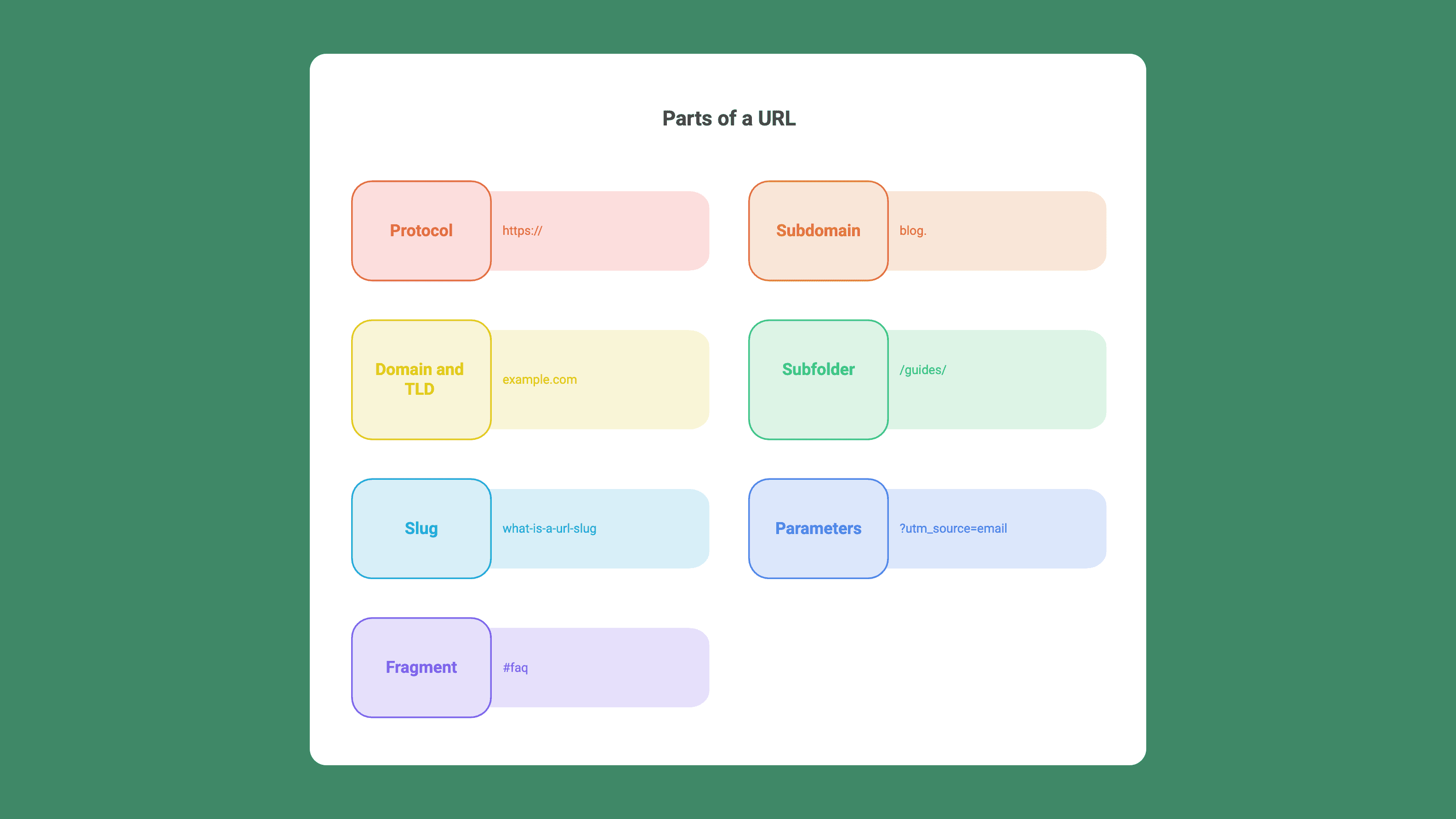
One distinction trips people up: the path includes both the directory and the slug, but it does not include parameters or fragments. The slug is only the page-identifying segment, the descriptive part within the broader url structure. Anything that starts with ? is a query parameter, and it is never part of the slug.
Slug vs permalink vs URL vs path
These terms overlap, so here is the clean version:
URL: the entire web address, from
https://to the end.Permalink: the permanent, full URL of a page. The slug is one part of it.
Path: the directory plus the slug, meaning everything after the domain and before any
?.Slug: the single segment that names the page.
Permalink and slug are not the same thing. You can change your permalink structure, say by adding or removing a /blog/ folder, while the slug itself stays identical.
Why is it called a slug?
The name comes from newspapers, not software. In hot-metal printing, a slug was a single line of type cast as one piece of metal on a Linotype machine, a sense Etymonline dates back to the 1800s.
Newsrooms then used slug or slugline as the short working name for a story as it moved through editing, a convention Wikipedia documents from newsroom style guides. When WordPress made the editable page identifier visible in its interface, developers borrowed the same word, and it stuck.
Do URL slugs affect SEO?
A little, but less than most guides claim. Google's John Mueller has described words in a URL as a "very very lightweight" ranking factor, a lightweight factor used mainly to guess a page's topic before Google has crawled it. Once the page is indexed, the content does the real work. The actual content matters far more than the slug.
Ahrefs puts it plainly, calling the slug's weight as a ranking factor "overrated in the SEO community."
Backlinko, in an analysis of 11.8 million search results, found that page-one URLs average around 66 characters, and that URLs ranking at position one tend to be about 9 characters shorter than those at position ten.
That is a correlation, not evidence that trimming your slug lifts rankings. Shorter URLs also tend to belong to older, more established pages.
So why bother with slugs at all? A readable slug is easier for a person to trust and click in search results, can be adjusted to better match user intent even if the SEO effect remains limited, gives Google a small early signal about the page topic, and is far easier to remember and share.
It also supports user experience and can help click through rates alongside trust and memorability.
How to write user friendly URL slugs
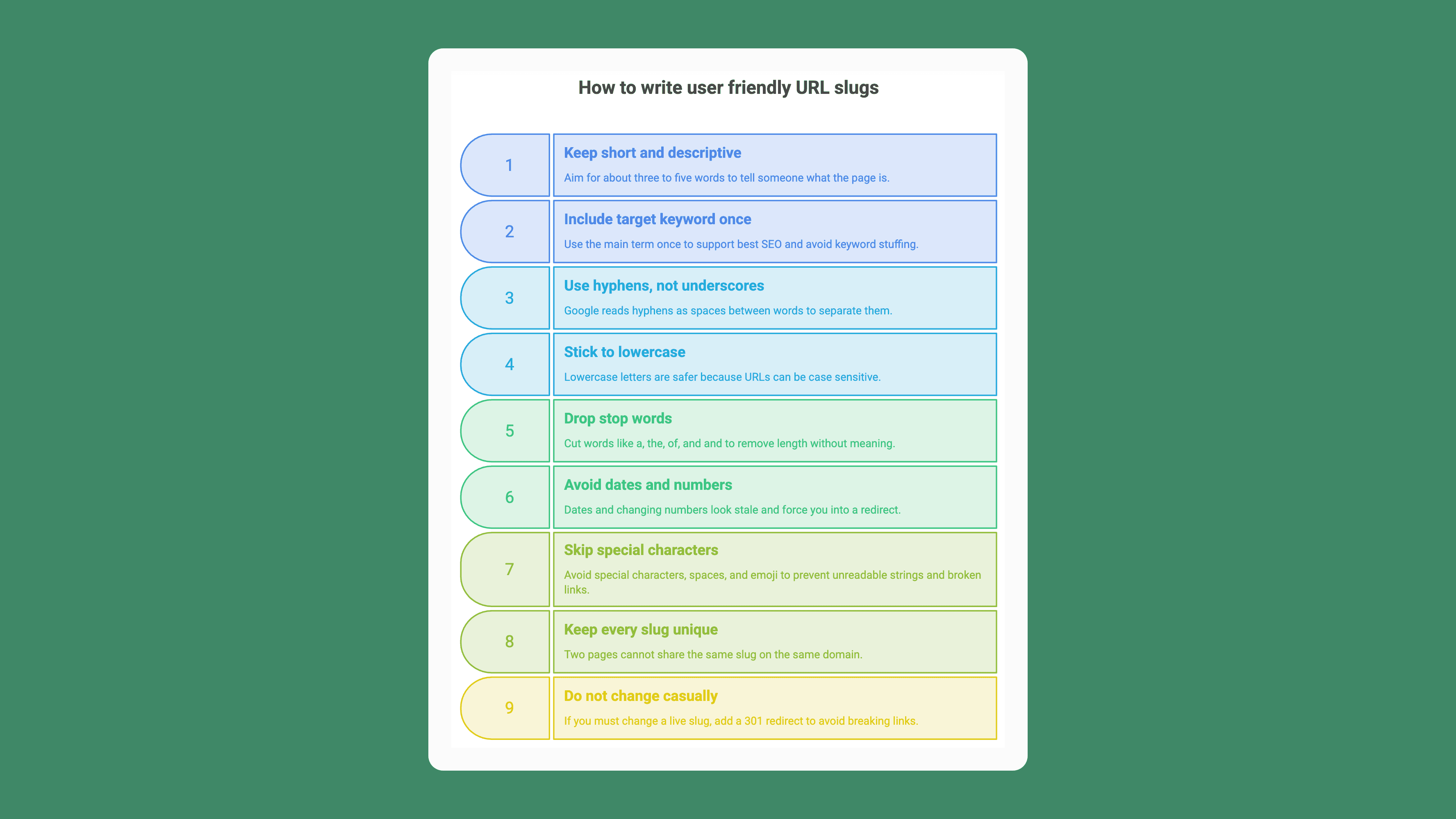
Good slugs follow a short list of best practices for writing seo friendly slugs that every major SEO source agrees on:
Keep it short and descriptive. Aim for about three to five words. The slug should tell someone what the page is before they click.
Include your target keyword once. It is the shortest accurate description of the page, so it usually belongs there without any forcing; using the main term once supports best seo when it matches the page's topic, and helps avoid keyword stuffing.
Use hyphens, not underscores. Google reads hyphens as spaces between words; underscores join words together, so use hyphens to separate words.
Stick to lowercase. Some servers treat
/Pageand/pageas different URLs, which creates duplicates or 404s, because URLs can be case sensitive, so lowercase letters are safer.Drop stop words. Words like a, the, of, and and add length without meaning. Cut them unless the slug reads badly without them.
Avoid dates and changing numbers.
/best-tools-2024looks stale within a year and forces you into a redirect.Skip special characters, spaces, and emoji. They get encoded into unreadable strings and can break links.
Keep every slug unique. Two pages cannot share the same slug on the same domain.
Do not change a live slug casually. If you must, add a 301 redirect from the old URL, or you break every existing link and lose the SEO value those links passed.
A quick before-and-after:
Weak:
/10-amazing-tips-for-researching-keywords-in-2024Better:
/keyword-research
Here are two examples: the first is a bad url slug, and the second is a concise slug.
The second version is shorter, focused on one keyword, and will not age.
How to edit a URL slug in your CMS
Most content platforms create an automatically generated slug from the title for each new post or page, then let you override it. Here is where to look. Editing it only makes sense if the default version is not clear or user friendly.
WordPress
Set your permalink structure first under Settings > Permalinks, and choose "Post name" so slugs use words instead of ?p=123. After that, edit the slug on any post or page in the editor's URL panel. If you run Yoast SEO, it adds a slug field and checks whether your focus keyword appears in it.
Shopify
Shopify calls the slug the handle. You edit it under a product or page's "Search engine listing" section, and Shopify offers to create a redirect when you change it. Its fixed prefixes like /products/ and /collections/ cannot be removed.
Wix, Squarespace, and HubSpot
All three generate a slug from the title and let you rename it.
Wix and HubSpot create a redirect automatically when you change a published URL.
Squarespace assigns a slug per page or collection item that you can edit in its settings, and changing slugs on live pages requires redirects to preserve links and avoid broken URLs.
Whatever the platform, the rule holds: if you change the URL of a live page, redirect the old slug to the new one.
URL slugs vs short-link slugs (the back-half)
The same idea shows up in link shorteners, where the custom part after the domain is also called a slug, or the back-half.
In go.brand.com/spring-sale, spring-sale is the slug. Bitly and Rebrandly both use this exact language.
There is one difference that matters, and almost no SEO guide mentions it. A short-link slug sits in front of a redirect.
When someone opens go.brand.com/spring-sale, they get a 301 redirect to the real destination, so the keyword in a short-link slug does not pass SEO value to that destination page.
Its value is trust, memorability, and click-through. A branded, readable back-half gets clicked more often than a random string like /xY9zPq.
This is where a link platform earns its place. In ShortPen, every link is a domain plus a slug.
You can use the default shr.pn domain or connect your own branded domain, then set a readable slug like /summer-offer when you create the link. If that slug is already taken on your domain, ShortPen flags the conflict so you can pick another or switch domains.
If you build links programmatically, ShortPen's REST API creates one with a POST /v1/generate call, sets the slug through the custom_slug field, and returns the finished link in data.link. The same call can generate a QR code and turn on event tracking.
One thing to plan for: changing a slug or domain creates a new public link, so any QR code you already printed keeps pointing to the old address.
You can test custom slugs, QR codes, and analytics on ShortPen's free plan, which includes unlimited links, clicks, and QR codes. Full API access and advanced analytics sit on the paid plans, with a 14-day trial if you want to try them.
FAQ
What is a URL slug in simple terms?
It is the readable part of a web address that names a specific page, sitting after your domain. In example.com/about-us, the slug is about-us. It usually describes the page and is the part you can rename in your CMS.
What is the difference between a slug and a permalink?
The permalink is the full, permanent URL of a page. The slug is one segment of that permalink, the part that identifies the page. You can change the wider permalink structure while keeping the same slug.
Do URL slugs affect SEO?
Slightly. Google's John Mueller has called words in a URL a very lightweight ranking signal, most useful before the page is crawled. A url slug important for SEO is mainly about clarity before indexing, not a major ranking factor. The bigger wins are readability and click-through, so write slugs for people first.
How long should a URL slug be?
Aim for about three to five words. Shorter slugs are easier to read, share, and fit in search results. Concise, descriptive slugs can also look better in google's search results and improve how your page appears in snippets. Backlinko found page-one URLs average around 66 characters, though that is a guideline, not a hard limit.
Should I use hyphens or underscores in a slug?
Hyphens. Google treats hyphens as spaces between words, so url-slug-guide reads as three separate words. This improves readability for users and search engines. Underscores join words together, which search engines handle less cleanly.
Can two pages have the same slug?
No, not on the same domain. Each slug has to be unique so the server knows which page to serve. If you try to reuse one, your CMS or link tool will flag a conflict.
What happens if I change a slug after publishing?
The old URL stops working and returns a 404 unless you add a 301 redirect to the new one. A redirect keeps existing links, bookmarks, and ranking signals intact. Always redirect a live page.
What is a slug in a short link, and can I customize it?
In a short link, the slug is the custom back-half after the domain, like spring-sale in go.brand.com/spring-sale. Most link platforms let you set it. In ShortPen you set it in the dashboard or through the API's custom_slug field.
Conclusion
A URL slug is a small piece of a web address, but it does real work. It tells people and search engines what a page is, it shapes whether a link looks trustworthy, and it can break things if you change it without a redirect. Treat it as a readability and trust decision first, and a minor SEO one second.
Next time you publish a page or share a branded short link, spend the extra ten seconds to write a clean, descriptive slug. If you want control over slugs on branded short links or need to set them at scale through an API, you can try it on ShortPen's free plan.
Ready to make every click count?
Simplify your link management, gain valuable insights, and take control of your online presence. Your journey to better links starts here.