Trackable QR Code Generator: Track Every Scan, Device, and Conversion
Last updated:
ShortPen University


LucaG is the co-founder of ShortPen. Before that, he built Guadagnissimo from scratch, a personal finance blog that reached hundreds of thousands of readers per year and was later acquired. That experience is where he learned SEO and marketing attribution hands-on. He also runs NTSOT, a newsletter on tools for work and life. His background spans product design, growth, and building online businesses.
Show more
A trackable QR code is a dynamic QR code. It encodes a short link, so every scan passes through a redirect that logs the time, location and device before sending the visitor on. A static code from a free generator cannot be tracked.
You printed a flyer, sent a batch of packaging out, or stuck a poster in a trade show booth. Two weeks later someone asks: did anyone actually scan the code? If you used a free static QR generator, the honest answer is "no idea."
A trackable QR code generator fixes that. It encodes a short URL that runs every scan through a redirect, captures metadata about who scanned and when, and forwards the visitor to your destination.
You see the scan in a dashboard within seconds.
This guide covers how trackable QR codes work, what you can measure, how to set one up, and how to connect scans to actual business outcomes like signups and purchases.
We'll use ShortPen's QR generator as the working example throughout.
What makes a QR code trackable
A trackable QR code is a dynamic QR code: the pattern encodes a short URL that points to a redirect server, which logs scan metadata before forwarding the visitor to your destination. Without that redirect layer, there is nothing to record.
Static vs Dynamic QR Codes
The distinction is binary. Every source in this category agrees.
A static QR code encodes the destination URL directly into the pattern. No server in between, nothing to track, and the destination is locked once printed.
A dynamic QR code encodes a short tracking URL. The request hits the generator's server first, which logs scan data and redirects to your destination. The destination is editable at any time, and every scan is recorded.
If you want any kind of tracking, you need dynamic. There is no workaround for static codes.
What "real-time" actually means
Most modern generators log scans within seconds, so you can watch them appear in the dashboard as people scan. This matters for live events, time-limited promos, and any campaign where you want to react while it's still live.
Every QR code generated in ShortPen is dynamic by default. No toggle, no upgrade required.
What you can actually track (and what you can't)

Trackable QR code generators capture metadata from the HTTP request when a scan hits the redirect server. Here's what's standard, and what isn't possible.
The metrics every good generator captures
Real-time analytics let you monitor scans, locations, device types, and timing for actionable insights.
Total scans: every scan event, including repeats from the same device
Unique scans: one device counted once, regardless of how many times it scans
Location: city and country, derived from IP address
Device type and operating system: iOS, Android, Windows
Browser: Safari, Chrome, Firefox
Time and date of each scan
Referrer or source: when combined with UTM tags, you see which placement drove the scan
ShortPen surfaces all of it in link-level analytics, and rolls it up across many links at the workspace level. These insights help optimize your marketing strategy without identifying individual users.
What you cannot track
The identity of the scanner. You see the device or phone type, not the person. To tie a scan to a named individual you need an explicit signup or login step on the destination page.
Exact GPS coordinates. Location data comes from the device’s IP address, which gives city and country accuracy. Precise GPS is only available if the user grants location permission to the destination site.
Anything that happens after the redirect. For pageviews, time on site, and completed actions you need a conversion tracking layer.
Total scans vs unique scans: read the ratio
The ratio of total to unique tells you about engagement type. High total-to-unique means people are scanning more than once, which is what you want for menus, loyalty programs, and product packaging. A ratio close to 1:1 means broad single-touch reach, typical of billboards.
A campaign with 10,000 total scans and 8,000 unique devices has roughly 20% repeat scans. That's a different campaign than 10,000 scans with 9,800 unique devices, even though the topline is identical.
ShortPen tracks Scans separately from Clicks, with totals and uniques on every link.
How to create a trackable QR code in 5 steps
The workflow below shows how to create trackable QR codes with any quality trackable QR code generator. Specifics are written for ShortPen.
Step 1: Pick the destination URL

The page you want scanners to land on. A product page, menu, signup form, or calendar booking. If you have a custom domain connected, the short URL itself uses your branded domain, which improves trust and click-through.
ShortPen includes one custom domain on the free plan, which is rare in this category.
Bitly's free plan includes none, and Rebrandly's free plan caps at 10 branded links per month.
Step 2: Generate the short link (and the QR)

In ShortPen, a QR code is always generated from a link. One link, one QR. Analytics live at the link level, so scans roll up alongside clicks in the same dashboard. Create the link, toggle QR on, and the QR is ready to download.
Step 3: Add UTM parameters

To view QR-driven traffic inside Google Analytics 4 alongside other channels, add UTM parameters to the destination URL before generating the QR:
utm_source=qr_<placement>(e.g.qr_flyer,qr_packaging,qr_booth)utm_medium=qr_code(consistent across all QR campaigns, so you can filter all QR traffic in one GA4 view)utm_campaign=<campaign_name>
ShortPen includes a UTM builder inside the link creation flow, so you don't need a separate Campaign URL Builder tab open.
Step 4: Customize the design and download
Customized QR codes outperform plain black-and-white ones. Vendor data puts the lift around 30%.
Treat that as directional, but the principle holds: a branded code with colors, a logo, and a clear "Scan to..." instruction next to it gets scanned more than a generic square.
Use SVG for print and PNG for digital. Keep logos within 15-20% of the code area, and don't cover the three finder squares in the corners.
Step 5: Test on real devices before printing
Select a few real devices and test conditions before printing.
Test on iOS and Android, in the actual lighting and at the actual print size. Confirm the destination loads and that test scans show up in your analytics dashboard.
A code that scans on your laptop but not under fluorescent retail lighting is a problem you want to find before the print run.
Beyond scans: tracking what happens next
This is the part most trackable QR code generators skip, and it's the most important.
A scan is a touchpoint, not an outcome.
Knowing that 500 people scanned your packaging code tells you reach.
It doesn't tell you whether any of them signed up, bought something, or completed the action you care about.
Why most QR generators stop at the scan
Most tools in this category were built to measure reach for print campaigns. The product roadmap stopped at scans by country and device because that’s what marketers asked for in 2017. You get a beautiful dashboard, but no answer to “did the QR campaign generate revenue?”
The honest answer requires a second layer: post-scan conversion tracking, because scan counts alone do not reveal conversion rates or revenue.
How post-scan attribution works

A tracking pixel installed on your destination site listens for defined events.
When a visitor who arrived via a QR scan completes one (purchase, signup, form submission), the pixel attributes that conversion back to the QR code that initiated the session, and pixel-based tracking can also support retargeting to re-engage offline prospects. You see scans and conversions side by side, on the same link.
With ShortPen, you install the Pixel once on your site, then define events directly from the dashboard, with controls at your fingertips.
Events can be URL-triggered (visitor reaches /thank-you) or code-triggered (a JavaScript call fires on a button click, useful for single-page apps or modal forms). Every event is attributed to the link, and therefore the QR, that drove the session.
There is an easy setup involved: add the Pixel snippet, define the events, and enable event tracking on the relevant links.
Events are not retroactive, they only count from the moment they’re created.
Vendor case studies report 30-50% revenue lift on QR campaigns that close the conversion loop, treated as directional.
The underlying logic is solid: if you can see which printed code drove revenue, you can reallocate budget toward it.
Organizing trackable QR codes at scale
One QR code is easy. Fifty QR codes across four clients and eight campaigns is where it falls apart.
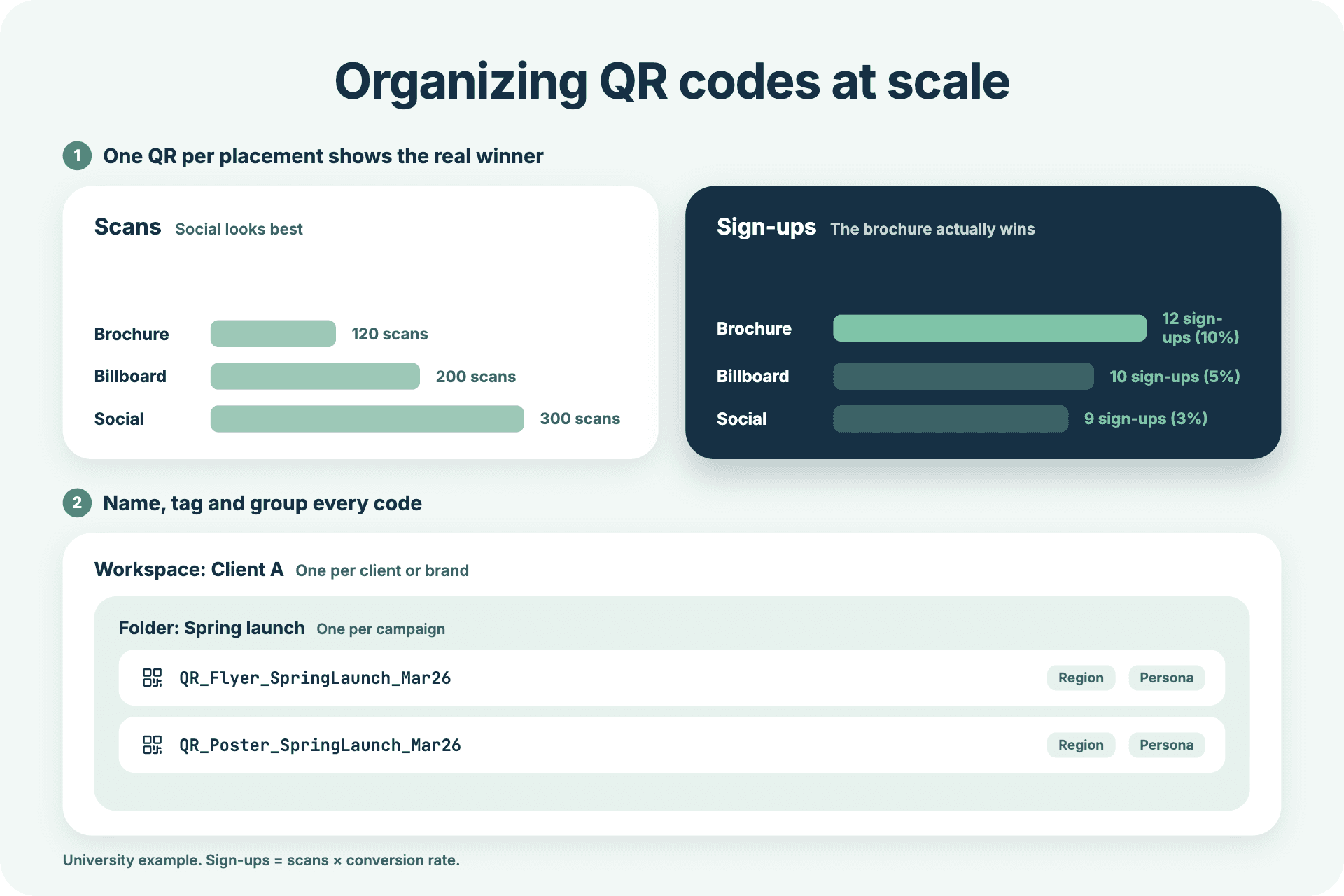
One code per placement, not one code for everything
If you want to compare performance between channels or placements across marketing campaigns, each one needs its own QR. A single shared QR across five posters tells you nothing about which poster is working.
A university running three channels for the same master’s program landing page made this clear: brochures generated 120 scans at 10% conversion, billboards generated 200 scans at 5%, and social posts generated 300 scans at 3%.
The billboard had the highest scan count but the worst conversion rate.
If they had used one shared QR, the brochure would have looked like the weakest channel, when it was actually the best.
Naming, tagging, and folders
A naming convention saves hours of dashboard archaeology. Something like QR_< channel>< campaign>< date> keeps reports readable: QR_Flyer_SpringLaunch_Mar26 tells you everything at a glance.
ShortPen includes unlimited folders and tags on every plan. Group by campaign, tag by region, persona, or audience segment, filter however your reporting needs it.
Workspaces for agencies and multi-brand teams
For agencies or multi-brand operators managing multiple companies or brands, one workspace per client keeps data cleanly separated. ShortPen Plus includes 4 workspaces ($23/month), Scale includes 10 ($55/month). Enough for most agency setups without enterprise pricing.
Pairing your QR analytics with Google Analytics 4

ShortPen's native analytics show the scan event: device, location, time, source. Google Analytics 4 shows post-scan behavior: pages viewed, time on site, funnel completion. Together they give you the full picture.
Why use both
Native QR analytics answer "did anyone scan, and who?" GA4 answers "what did they do once they got there?" Neither is a complete picture on its own.
The UTM convention that works
Append these parameters to your destination URL before generating the QR:
utm_source=qr_<placement>utm_medium=qr_code(consistent across all QR campaigns)utm_campaign=<campaign_name>
The consistent utm_medium=qr_code value matters. It lets you filter all QR-driven traffic in a single GA4 segment, regardless of which physical placement drove it.
Validating the setup
Use GA4's DebugView to confirm UTM parameters are flowing through correctly. Scan your test code, watch the page_view event arrive, and check that utm_source, utm_medium, and utm_campaign appear as expected. If they don't, the QR is pointing to a URL where the parameters got stripped, usually by a redirect chain.
What a free trackable QR code generator actually gives you
The “free trackable QR code generator” search results are mostly free tiers with quiet caps, so people often expect a free qr code option right away. Worth knowing what each one actually includes before committing to a tool.

What the free tier actually covers
Most free dynamic QR generators cap at least one of three things:
Number of dynamic codes: common cap is 3 to 5
Monthly scans tracked: common cap is 100 scans per code
Analytics retention: common cap is 7 to 14 days
QR Code Generator's dynamic codes expire entirely if you stop paying. QR Tiger limits dynamic codes by quantity on the free plan. Bitly's free plan tracks scans but caps total monthly volume. Rebrandly's free plan caps at 10 branded links per month, full stop.
What a usable free plan should include
Unlimited dynamic QR codes (not capped at 3 or 5)
Real scan analytics, not just a total scan count
At least one custom domain so links are branded
Analytics retention long enough to compare campaigns
ShortPen's free plan includes unlimited QR codes, unlimited scan tracking, 30-day analytics history, 100 tracked conversions per month, and one custom domain. Most direct competitors gate at least three of these behind a paid plan.
Practical use cases where trackable QR codes earn their place
Where the scan layer plus a conversion layer actually pays off.

Print campaigns and out-of-home
Flyers, posters, billboards. One unique QR per location lets you compare which placement drives the most engagement and the most downstream conversions, and shows how your audience interacts with each code.
Product packaging
Per-SKU codes reveal which products generate the most digital engagement. Update the destination content (recipe page, warranty form, manual) without reprinting.
Events and trade shows
Per-booth codes track which booths drove the most engagement. Session-resource codes track which talks people wanted materials from. Badge scans can feed real-time attendance dashboards. Event materials show some of the highest scan rates of any physical channel, often 10-20% of distributed materials.
Restaurants and retail
Menu codes that update without reprinting. Table codes for ordering. Loyalty and feedback codes that route to short forms. Roughly 75% of restaurants worldwide use QR menus, and the operators who track them can identify peak hours, popular items, and underperforming locations.
Business cards and sales collateral
One code linking to a vCard, landing pages, portfolio, or calendar booking. Track which conferences and meetings drive the most networking activity, and whether scans actually convert to booked calls.
FAQ
Are static QR codes trackable?
No. Static QR codes encode the destination URL directly into the pattern, with no redirect server in between. Nothing to log, nothing to track. You need a dynamic QR code.
Are trackable QR code generators free?
Most have a free tier, but read the limits. Free plans typically cap the number of dynamic codes, monthly scans, or analytics retention. ShortPen's free plan includes unlimited QR codes, unlimited scan tracking, and 30-day analytics history.
Can you track who scanned a QR code?
You can track the device: country, city, OS, browser, and time. You cannot identify the person. To tie scans to known users, pair the QR landing page with a signup, login, or form step.
Can I change the QR code's destination after printing?
Yes, with dynamic codes. Changing the destination URL keeps the same QR working. Changing the slug (the part after the domain) requires a new QR and a reprint. Pick durable slugs for long-life print assets.
How do I track conversions, not just scans?
Install a conversion pixel on your destination site and define the events you want to track (purchase, signup, form submission). ShortPen's Pixel covers 100 events/month on the free plan and 10,000 on Plus, attributed back to the QR that drove the session.
Is QR code tracking GDPR-compliant?
Standard scan data (IP-derived location, user-agent, timestamp) is pseudonymous and doesn't identify individuals. ShortPen hosts data in the EU and stores no PII by default. For high-visibility codes, add a brief notice that anonymous scan data is collected.
Do I need Google Analytics in addition to a QR generator's dashboard?
Not strictly. Native QR analytics tell you about the scan: device, location, time. GA4 tells you what happens after: pages visited, time on site, conversions. Use both for a complete view.
Trackable QR Code Generator: Conclusion
A trackable QR code generator turns a printed square into a measurement layer. You see who scanned, when, where, and on what device, in seconds.
The work that earns its keep, though, is the next step: connecting scans to outcomes so you can answer the only question that matters at budget time, which is whether the campaign actually drove results.
You can test the full setup (dynamic QR, scan analytics, conversion tracking, custom domain) on ShortPen's free plan without a credit card.
Start with one QR for one campaign, install the Pixel, define one event, and watch the loop close.
Ready to make every click count?
Simplify your link management, gain valuable insights, and take control of your online presence. Your journey to better links starts here.