What is a Short Link? How They Work, Why They Matter, and How to Create One
Last updated:
ShortPen University


LucaG is the co-founder of ShortPen. Before that, he built Guadagnissimo from scratch, a personal finance blog that reached hundreds of thousands of readers per year and was later acquired. That experience is where he learned SEO and marketing attribution hands-on. He also runs NTSOT, a newsletter on tools for work and life. His background spans product design, growth, and building online businesses.
Show more
A short link is a shortened web address that redirects visitors to a longer destination URL. If you have ever clicked a bit.ly address in a text message or scanned a QR code on a poster, you have already used a short link.
Long URLs are awkward to work with. They wrap across lines in messages, they look suspicious next to clean branded text, and they tell you nothing about who clicked them. Short links solve the first two problems immediately, and when configured properly, they solve the third as well.
This guide covers what a short link is made of, how the redirect works, what data it can track, whether short links are safe to click, and how to create one by hand or through an API.
What is a short link?
A short link is a compact URL that points to a longer one. It is built from two parts: a domain and a slug. Together they form the address you share, and behind it sits the destination URL where visitors actually land.
Take a product page with tracking parameters attached:
https://www.example.com/collections/summer/products/linen-shirt?variant=8842&utm_source=newsletter
Shortened, that becomes:
https://go.example.com/summer
Here, go.example.com is the domain, summer is the slug, and the original address is the destination URL. The slug is unique per domain, so go.example.com/summer can only ever point to one place at a time.
You will see several names for the same thing. Short link, shortened URL, tiny URL, and link shortener output all describe the same object. A branded link (sometimes called a vanity URL) is a short link built on a domain you own rather than a shared public one.
One distinction worth keeping straight, because most explanations blur it: the URL shortener is the tool, and the short link is what the tool produces.
In ShortPen, for example, a link is that same domain-plus-slug object, with the addition that you can name it, file it into folders, tag it, and track it.
How does a short link work?
When someone clicks a short link, the shortener receives the request, looks up the slug in its database, finds the matching destination URL, and tells the browser where to go next. The visitor's browser then loads the destination directly.
The whole exchange is fast enough to be invisible. A lookup and redirect typically completes in roughly 50 to 150 milliseconds, which is why a short link feels like a normal link rather than a detour.
The instruction the shortener sends back is an HTTP redirect, and the type matters more than most guides admit:
301, permanent. Tells browsers and crawlers the move is final. Some clients cache it and stop checking back with the shortener.302, temporary. The client keeps asking the shortener for the current destination on each visit.307and308. Temporary and permanent equivalents that preserve the original HTTP method, useful in technical flows like webhook testing.
The practical consequence is simple. If there is any chance you will want to change where a link points later, a temporary redirect keeps that option open, because clients keep checking rather than relying on a cached answer. A permanent redirect suits a destination that genuinely will not move.
ShortPen supports all four types and defaults to 301, though 302 is the better choice for most marketing links since it keeps click tracking reliable and the destination editable. You can change the redirect type per link under advanced options.
Why teams use short links and branded short links
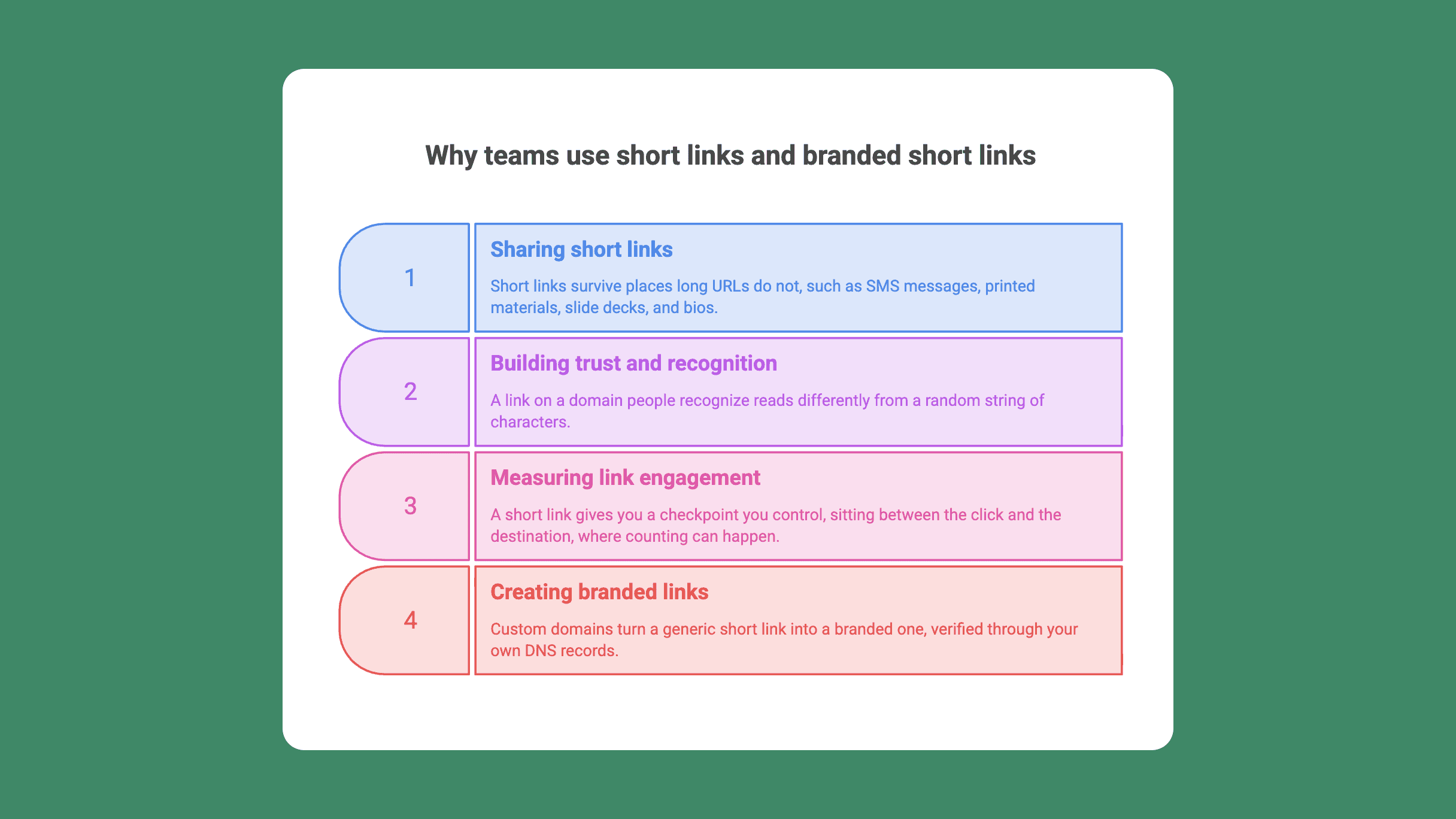
The reasons fall into three groups, and only one of them is about aesthetics.
Sharing. Short links survive places long URLs do not: SMS messages with character limits, printed materials, slide decks, podcast scripts, and bios where you get one line. A reader can retype go.example.com/summer from a flyer or poster, and in offline marketing they are also easier to scan when paired with QR codes. Nobody retypes a URL with a query string.
Trust and recognition. A link on a domain people recognize reads differently from a random string of characters.
Rebrandly reports that branded links can increase clicks by around 39%, though it is worth noting that figure comes from a vendor's own experiment and user data, not independent research. Treat it as directional rather than settled.
An older MarketingSherpa study often cited alongside it dates to 2008 and should be read as history.
Measurement. You cannot count clicks on a raw URL you paste into a newsletter. A short link gives you a checkpoint you control, sitting between the click and the destination, where counting can happen.
Many businesses use custom links or branded short links in marketing campaigns to track engagement across channels, from social media and social media posts to emails and ads, and link tracking helps optimize those efforts.
That last point is where a short link stops being cosmetic.
Custom domains are what turn a generic short link into a branded one: instead of a default shr.pn address, links go out as go.yourbrand.com/slug, verified through your own DNS records. That also lets teams create custom short links and memorable links they can reuse across multiple campaigns with centralized tracking.
What short links let you track
A short link can measure two distinct layers with detailed analytics at both the click and conversion layers, and most explanations only cover the first.
Click-level data answers who arrived and how: total clicks, referrer or traffic source, device type, and location, including reporting on click statistics and click-through rates. If the link has a QR code, scans are counted the same way.
Post-click data answers what happened next. Did the visitor sign up, buy something, or reach a confirmation page? This layer needs a tracking script on your site, because the shortener's visibility otherwise ends at the redirect. Conversion tracking improves understanding of audience engagement and helps optimize marketing campaigns more effectively.
Put together, the path looks like this: click or scan, then session on your site, then a defined conversion event. Reading those three stages against a single link tells you which channel produced revenue rather than just traffic.
UTM parameters do the connective work. Tags like utm_source and utm_campaign travel inside the destination URL, so the same campaign shows up consistently in GA4 alongside your link data. Some platforms, including Rebrandly, include conversion tracking in their analytics tools.
In ShortPen, clicks, QR scans, sources, devices, and locations are tracked automatically with no extra setup for trackable links, so teams can also track link analytics without changing how the product works.
For the post-click layer, you install the ShortPen Pixel once, then define events from the dashboard, either URL-triggered (someone reached a thank-you page) or code-triggered (someone completed a specific action in your app).
An Event Testing Panel confirms events fire correctly before a campaign goes live, and UTMs can be attached when you create the link.
One correction on a claim you will still find in older articles: the "third-party cookies are disappearing" argument is out of date.
Google reversed its plan to deprecate third-party cookies in Chrome in April 2025 and wound down most Privacy Sandbox APIs later that year.
Short links still matter for measurement, for a better reason: they are a first-party checkpoint you own outright, independent of whatever browsers decide next.
Static vs dynamic short links (and why it matters for QR codes)
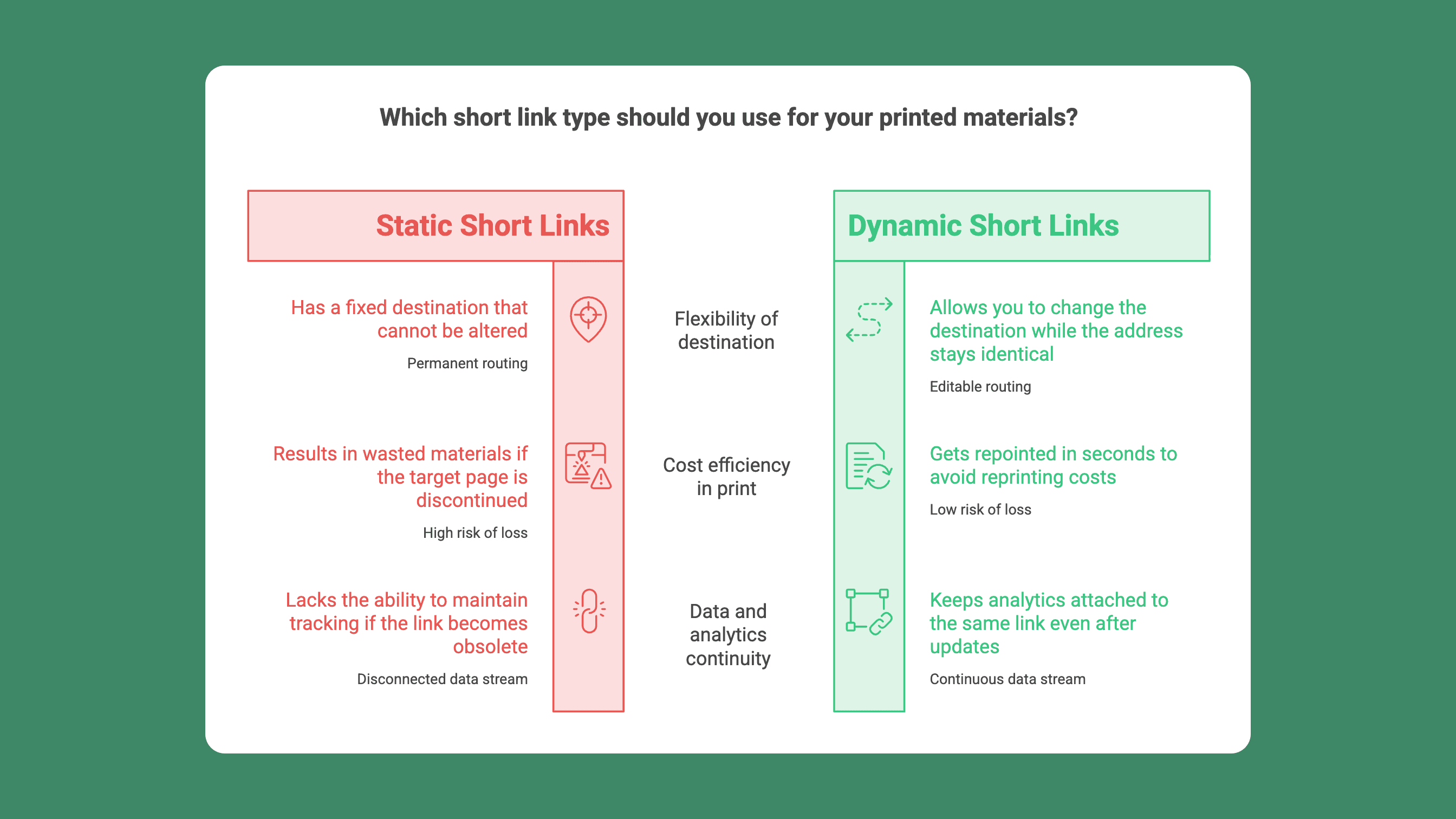
A static short link has a fixed destination. A dynamic one lets you change the destination while the shared address stays identical. Many URL shorteners automatically generate QR codes alongside the short link.
The difference is invisible online, where you can always edit a post. It becomes expensive in print. A static QR code on 5,000 printed flyers pointing at a discontinued product page is 5,000 wasted flyers. A dynamic one gets repointed in seconds.
Public familiarity with QR codes increased during the pandemic, which made dynamic QR use in print more practical. Every QR code in ShortPen is dynamic. The code encodes the link's domain and slug, so changing the destination behind it leaves the printed code working and keeps analytics attached to the same link.
There is a nuance worth understanding before you print anything. Editing the destination is safe and preserves your data.
Changing the slug or domain creates a new public URL, the old one stops working, and anything already printed would need reprinting. Destination changes are free; address changes are not.
Are short links safe?
Short links are safe when they come from a source you trust, and risky precisely because they hide where they lead. A malicious short link looks identical to a legitimate one.
Attackers exploit this, and scammers often use shorteners to disguise scam links. Security firm Cofense found that across commonly abused shortening services, a substantial share of campaigns delivered malware or credential phishing, with some services used almost exclusively for that purpose.
The same technique has moved offline as "quishing", where a fraudulent QR code sticker is placed over a legitimate one on a parking meter or restaurant table.
Checking an unfamiliar short link takes a few seconds:
Expand it before opening. A URL expander or preview service reveals the destination without visiting it.
Hover first on desktop. The status bar shows the address, though it will show the short domain rather than the final destination.
Treat unexpected QR codes as suspicious. Physical stickers that look applied after the fact deserve scrutiny, as do codes in unsolicited emails.
Check the domain, not the design. A recognizable branded domain is a meaningful signal. A random string is not.
This cuts both ways for anyone sending links. Branded domains are a legitimacy signal that a shared public domain cannot provide, since recipients can see your brand in the address itself. Options like password protection add a further layer when a link is meant for a limited audience.
How to create a short link
There are two routes, depending on volume.
Manually, through a dashboard
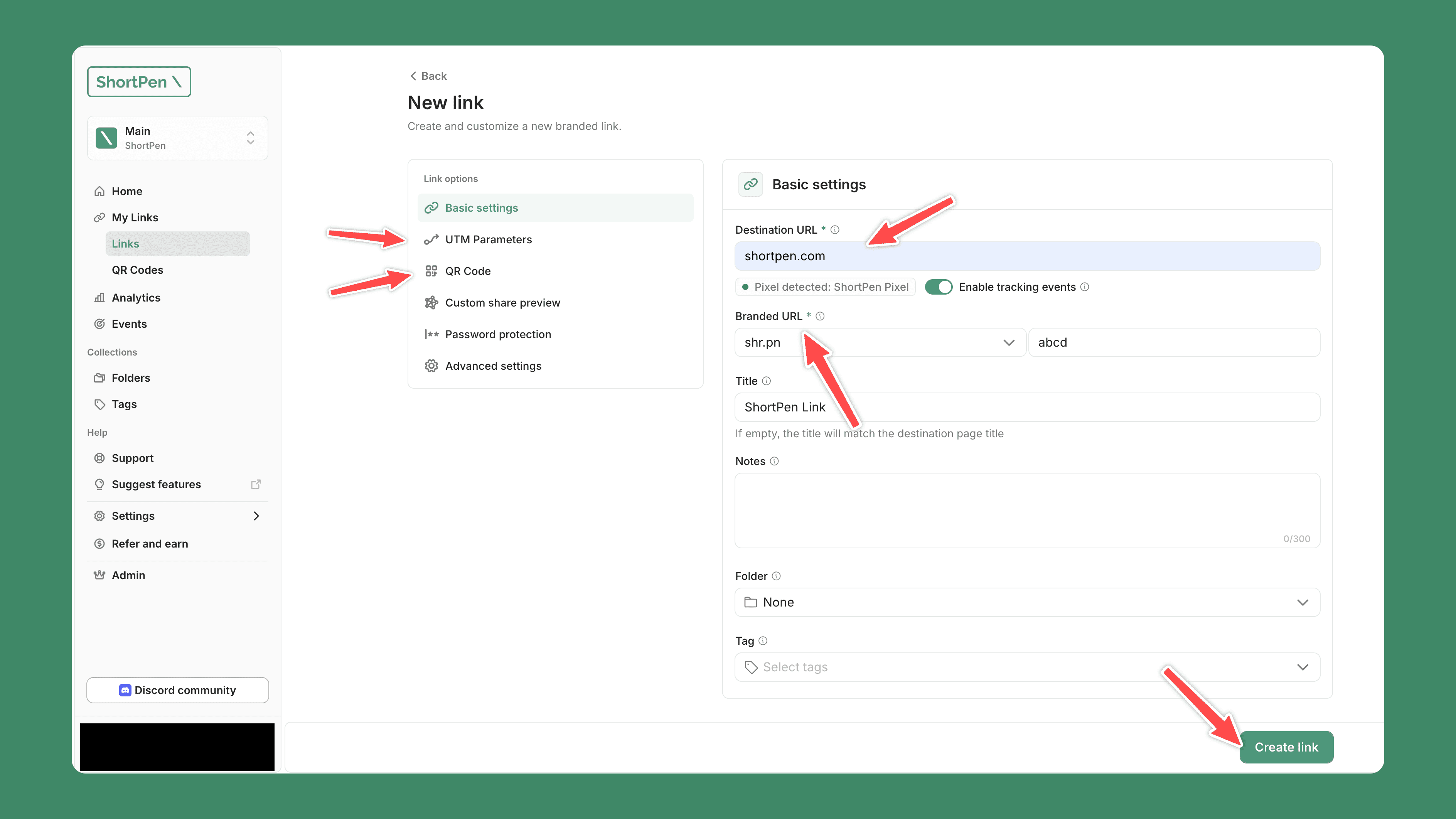
The flow is consistent across many sites and works like a short link generator or free link shortener workflow, so you can use a free URL shortener to create short links and share links in under a minute:
Paste the destination URL.
Choose a domain, either the provider's default or your own custom domain.
Set a slug, or let the tool instantly generate one.
Add UTM parameters, and many tools can also generate QR codes automatically during creation, plus event tracking if you need it.
Save and share.
Try ShortPen for free.
Create short links, dynamic QR codes, with ShortPen. It's free.
Programmatically, through an API
Teams generating links at scale, one per customer, per order, or per campaign variant, use APIs for link management across high-volume team workflows. ShortPen exposes a REST API where a single request uses a custom URL shortener to create shortened links programmatically.
A POST to /v1/generate at https://api.shortpen.com, authenticated with a bearer token, returns the finished link in data.link:
API-based link shortening gives teams full control and access to other tools or automation.
You pass custom_slug to control the branded slug, attach UTMs through the param object, and set generate_qr to true to receive a QR code in the same response.
The global rate limit is 60 requests per minute per token, and full API access is available on paid plans with powerful features, advanced features, and more advanced features for larger teams, including enterprise businesses.
When a short link isn't the right choice
Short links are not universally appropriate, and knowing when to skip one is part of using them well.
Skip the shortener for official and legal documents, where recipients need to verify the real domain themselves. Skip it for internal site navigation, where a normal relative link is simpler and faster.
More broadly, avoid a short link anywhere hiding the destination would reduce trust. If your audience has reason to be cautious, showing the full URL is the stronger move.
FAQ
Are short links safe to click?
Short links are safe when they come from a sender you trust. The risk is that they conceal the destination, so a malicious link is indistinguishable from a legitimate one at a glance. Expand unfamiliar links with a preview tool before opening them, and be wary of QR codes in unsolicited messages.
Do short links expire?
It depends on the provider. Many short links do not expire by default, but a link dies if the service shuts down, if you change its slug or domain, or if a custom domain lapses. Google's retirement of goo.gl links, softened in 2025 to preserve still-active ones, is the clearest example of why longevity matters.
Are short links bad for SEO?
No, provided they use a proper redirect and a single hop. Google has stated that correct redirects pass ranking signals, and that the specific redirect type is less important than using the technically appropriate one. Avoid chaining multiple redirects together, and avoid cloaking a destination from crawlers.
What is the difference between a short link and a branded link?
A branded link is a short link built on a domain you own, such as go.yourbrand.com/summer, instead of a shared public domain that redirects to the original web address. The mechanics are identical. The difference is recognition: recipients see your brand in the address rather than an anonymous string.
Can I change a short link's destination after sharing it?
Yes, if the link is dynamic. You can repoint the destination while the shared address and any printed QR code stay the same, so the same short link can keep pointing users to the same website even as the destination URL is updated behind it, and analytics remain attached to the link. Changing the slug or domain instead creates a new public URL, which breaks the old one.
What happened to Google's goo.gl links?
Google stopped new goo.gl link creation in 2019 and announced a full shutdown in 2025, then partially reversed course to preserve links still receiving traffic. The episode is a reminder that every short link depends on its provider continuing to exist.
Conclusion
A short link is a small piece of infrastructure sitting between your audience and your content. It makes a URL shareable, it puts your brand in front of a click, and it creates a checkpoint where you can measure what actually happened afterward.
The tradeoff is that it hides the destination, which is why using a recognizable domain and being transparent about where links lead matters as much as the tracking.
If you want to try this properly, you can create branded links, dynamic QR codes, and click tracking on ShortPen's free plan, with advanced analytics and full API access available on paid plans and a 14-day trial.
Ready to make every click count?
Simplify your link management, gain valuable insights, and take control of your online presence. Your journey to better links starts here.